

Normální zobrazení

Received before yesterday

Level Up with ESRB: Talkin’ Ratings – Family Game Time

Whether through board games, pen-and-paper RPGs, or video games – gaming has always been a part of our household.  Like most families, we also watch movies and television together, but the interactive nature of playing video games is something that we truly cherish.

I fondly remember when The Legend of Zelda: Breath of the Wild first came out, and both of my daughters were old enough to play.  The original game, The Legend of Zelda, was one of the first games I had when I was around their age and it was nice to share that with them.  Even though it’s a single-player game, the three of us sat on the couch battling monsters and trying to solve puzzles together. We took turns trying different strategies, while the other two shouted out suggestions.  We were talking, laughing, using our brains, and practicing how to share.

But not all games are appropriate for kids.  When they were younger, they were very curious about a different game I was playing that also involved riding around on horseback.  That game was Skyrim.  Skyrim is rated M for Mature and has plenty of content that isn’t appropriate for young kids.  I did, however, let my oldest sit on my lap and ride around on the horse.  If she ran into a combat situation, we paused the game and I explained that some parts weren’t for her before she would scoot off, somewhat disappointed that it wasn’t just a horse-riding simulator.

From their very earliest years, they knew that some games were for them – and some weren’t (yet).  They also knew that their father was not only making that determination as their dad, but also was behind the black-and-white letter that was on the front of the game’s box.

What Makes Up a Rating?

Most parents’ jobs don’t involve evaluating video games for age appropriateness. But that is precisely what I do for a living at the ESRB as its Senior Vice President of Ratings. ESRB assigns age and content rating information to video games and apps to help parents decide which products are appropriate for their kids.

An explanation of ESRB's three-part rating system. Includes Rating Categories, Content Descriptors, and Interactive Elements.

There are three parts to the system:

Rating Category
The Rating Category suggests whether a game may be appropriate for a certain age group. That doesn’t necessarily mean the game is designed or intended for that age group — just that the content is suitable. There are plenty of E-rated games that might still be too challenging or complex for a young child.

Content Descriptors
These provide more detail about what players will encounter in a game and ultimately what content led to the Rating Category assignment. In the case of Breath of the Wild, one of the Descriptors is Fantasy Violence. That means the game includes combat or action sequences that aren’t realistic or something you’d encounter in everyday life — such as battling a rock monster rather than a human foe. On the other hand, Skyrim has a Descriptor for Intense Violence signaling to parents that the violence is more graphic and/or realistic looking.

Interactive Elements
While not relevant to all games, Interactive Elements inform parents about non-content features that may be important to know before their child plays a game. For example, if a game allows players to communicate with others, you’ll see “Users Interact.” If it offers in-game spending, you’ll see “In-Game Purchases” or “In-Game Purchases (Includes Random Items).” These notices help families understand the kinds of interactions or transactions a game may include, allowing parents to plan ahead, discuss household rules around video games, and set parental controls to back them up.

For physical, boxed games, ESRB also provides Rating Summaries — short paragraphs that go a step deeper to describe in more detail the content of the game and the context in which it is presented to the player. These are especially helpful for parents who want more insight into why a game received its specific Rating Category and Content Descriptors.

Staying Involved

Sharing time in front of the TV with a controller in hand has created some of our most memorable family moments.  Lately, we’ve been playing through The Legend of Zelda: Tears of the Kingdom (the sequel to Breath of the Wild).  Their hand-eye coordination has now surpassed my own. They are more likely to take the controller away from me instead of relying on me to get them through.  They’re growing up.

Playing together has helped us stay connected and maintain open communication about games — what they’re about, why we enjoy them, and what’s appropriate for different ages. When parents understand what their kids love about games, it becomes easier to set household rules around playtime, online interactions, and spending.

For example, my younger daughter has been increasingly interested in Roblox over the past few years. Talking with her about why some of the experiences on Roblox resonated with her helped us talk about appropriate online interactions with others, what’s off limits, and more. For more information on establishing household rules and starting constructive conversations around video games visit ESRB’s Family Gaming Guide.

As mentioned, if you’re looking for a way to reinforce household rules, nearly every device that can play games — from consoles to smartphones — includes built-in parental controls.

These tools make it simple to:

  • Manage what your kids can play, based on the ESRB-assigned age rating.
  • Set time limits and control when games can be played.
  • Restrict with whom they can communicate.
  • Limit or block the ability to make in-game purchases.

Visit ParentalTools.org for step-by-step parental controls guides to help parents get started setting controls.

Ultimately, playing games together led to a lot of quality time for me with my daughters, and it’s one of the best ways to connect as a family.


The post Level Up with ESRB: Talkin’ Ratings – Family Game Time appeared first on ESRB Ratings.
Level Up with ESRB: Talkin’ Ratings – Roblox and Diverse Content

The giggles coming down the stairs were louder than usual, so I decided to investigate. Opening the door to our bedroom, I found my two daughters playing Dress to Impress on their laptops and cackling.  This was not unusual.  What was novel, though, was that they had looped their mother into the game.

What was so funny?

The Incident

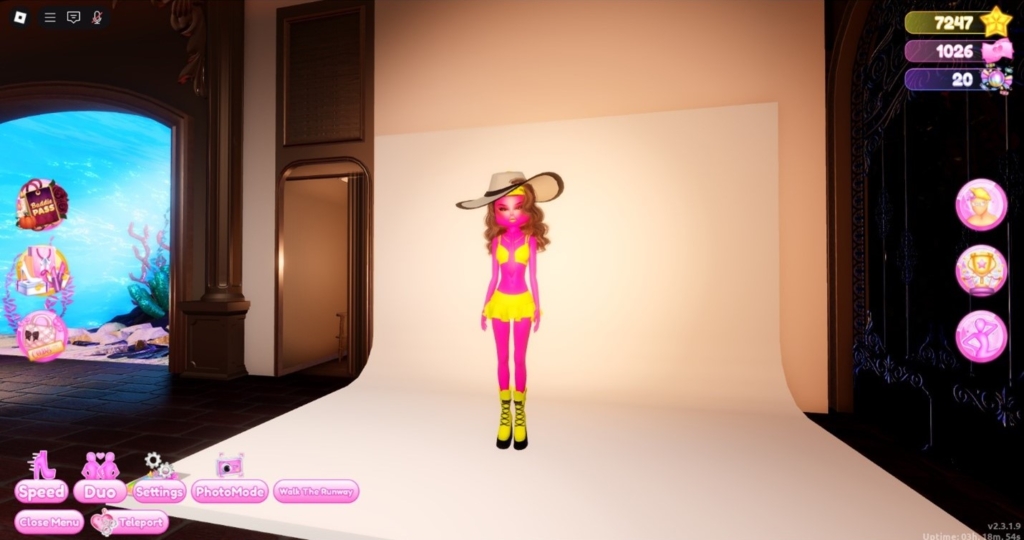
First, some background for the uninitiated. In Dress to Impress, players are given a theme for an outfit and an enormous closet with a wide variety of clothes to choose from.  As the name implies… players must then dress their avatar to impress the other players. When time runs out after choosing a look, players compete against each other for the best outfit.  This is where the laughter comes in. This part wasn’t going so well for my wife.

The chat was generally supportive to most of the players, with comments raging from “fire!” to “slayyyyy.” But poor Mom’s outfit was met with comments like “yikes” and “oh.”  This is around when I arrived. My daughters simply could not contain their glee.  In fairness, the outfit was an abomination.

An image of an outfit in Dress to Impress on Roblox. The image features a pink woman, wearing a yellow bikini, yellow boots, and a giant, floppy, yellow hat.

Editors Note: The outfit in question. AKA “SpongeBob and Patrick” in the chat.

While the outcome wasn’t entirely great for my wife, it was an impromptu moment that brought the whole Garrity family together despite the dozens of plans with friends, after-school commitments, weekend errands to run, and (of course) video games to rate swirling around us. This event stuck out to me though, reaffirming that it’s possible for video games to bring us together for these fun moments; even as my kids continue to grow. But it also occurred to me that, to nurture these moments, it’s important for parents to have a good idea of how to manage their kids’ video game experiences (on Roblox and beyond) to make sure they have fun and appropriate play.

Appropriate Play

Dress to Impress is just one of thousands of experiences on Roblox.  As a platform, the content available via Roblox experiences can range widely. Yes, there are many, many games with content akin to Dress to Impress, but there are also experiences designed for an older or more mature audience. So, how does ESRB approach rating a platform like Roblox with such varied content? Let’s start with the rating assignment and Content Descriptor.

Roblox is rated “Teen” with a Content Descriptor for “Diverse Content: Discretion Advised.”  The Diverse Content notice was designed to signal that a platform includes a wide range of content with varying levels of maturity. That way, parents know that they may need to go one step deeper to manage what their kids have access to when playing on a platform like Roblox.

Communication between players, such as those unimpressed fellow contestants in Dress to Impress, is a big part of Roblox and why so many kids find it compelling.  It’s why ESRB also assigned an Interactive Element for “Users Interact,” which serves as a flag for parents that those features exist and that you may want to have a chat before they start playing about with whom they can communicate online.

My daughters recently looped me into another Roblox experience they were playing – 99 Nights in the Forest.  As an avid gamer, I think they hoped I would bring something to the team to help ensure our survival.  Alas, this was not to be.  They quickly grew frustrated with my repeated deaths and complete lack of value to the overall objective. I died so frequently that they debated purchasing a revive to bring me back into the game.  This revive would cost Robux, which can be purchased with real world money.

To alert parents about the ability to spend real world money within Roblox, ESRB has assigned an Interactive Element for “In-Game Purchases (Includes Random Items).”  While buying a revive wouldn’t be considered a random item, some experiences on the platform do offer items that the player might not know exactly what they are receiving, like a loot box or some other bundle of different random items.

Parental Controls on Roblox

Fortunately, like other game devices and platforms, Roblox has a suite of parental controls to help you manage your child’s access to a whole host of interactive features. Roblox’s integrated parental controls allow you to block or limit with whom your kids can chat, as well as control the amount of money and time spent on the platform.

If I can offer one more piece of advice, it’s to make sure your kids are entering their actual, birthdate when signing up for Roblox (or for any platform/service for that matter). For Roblox specifically, doing so not only ensures that your kids’ data will be treated appropriately (i.e., adhering to pertinent laws and regulations governing the collection and sharing of personal information belonging to children), but it also activates a number of automatic guardrails around content, communication with others, screen time, and more.

In fact, all accounts belonging to children who are under the age of 13 automatically activate content filtering and disable online chat with others (unless you provide your consent, as a parent!). On top of these automatic features there are a number of controls that you can manage yourself, including limiting or blocking certain experiences, managing screen time limits, further restricting communications, blocking in-game purchases and more! Find out more here.

And one more thing, make sure you discuss with your kids that they should never move their chat with a stranger to another platform without your permission. It makes it impossible for Roblox to monitor for safety, and more challenging for you as the parent to know with whom your kids are speaking.

ESRB has step-by-step parental controls guides for many consoles and platforms at ParentalTools.org, and you can learn more about Roblox’s parental controls in our dedicated blog.

Play Together and Stay Involved!

Even with all these tools, playing together is the best way to keep an eye on what your kids are doing, gain an understanding of what they get out of playing games, as well as just spending quality time together.  It’s been one of the true pleasures of fatherhood to play video games with my girls, and I highly recommend it to all you parents out there…moms too!


Bill Garrity, Sr. Vice President, Ratings, ESRB.Bill is the senior vice president, ratings at ESRB, and is responsible for the issuance of all ratings in a timely, accurate, and consistent manner.  In addition, Bill leads the Rating Authority Working Group of the International Age Rating Coalition (IARC). 


The post Level Up with ESRB: Talkin’ Ratings – Roblox and Diverse Content appeared first on ESRB Ratings.

❌