Updated: November 19, 2025
In many homes it’s time to start thinking about what your kids want this holiday season (if you haven’t already!). No matter what you celebrate – even if it’s nothing at all – this time of year sees sales and deals for new games, consoles, and accessories that can be overwhelming to track for the uninitiated. Fortunately, we’re here to offer some helpful tips about:
- Many of the video game consoles your kids may be asking for this holiday season so you can decide which is the best fit for your home;
- Age-appropriate games that are available on each platform; and
- What each device offers with respect to parental controls that help you manage the games your kids play, with whom, for how long and how much money they can spend, if any.
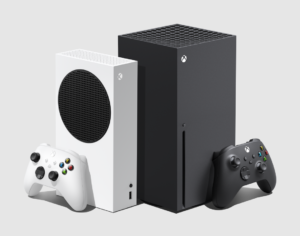
Microsoft’s Xbox Series X|S

The Xbox Series S (Left) and Series X (Right)
Microsoft offers not one, not two, but three consoles: The Xbox Series X, The Xbox Series X – Digital Edition, and the Xbox Series S. They all play the same games but there are a few notable differences that may help you decide which is a better fit for your children.
- Xbox Series X – The Xbox Series X is the fastest and most powerful Xbox ever. The Series X loads the latest high-res games with speed. Additionally, the Series X can play games via disks or download.
- The Xbox Series X (disk drive, 1 TB) starts at $649.99
- The Xbox Series X (disk drive, 2 TB) starts at $799.99
- Xbox Series X – Digital Edition – The Digital Edition plays games exactly like the standard Series X, except the Digital Edition does not have disk drive. This means that the Series X – Digital Edition can only play games via download or cloud streaming.
- The Xbox Series X – Digital Edition starts at $599.99
- Xbox Series S – Xbox Series S plays games similarly to the Series X consoles, although it has 1440p resolution as opposed to the Series X’s 4K. While it can play all the same games, it’s important to note that the Xbox Series S is an all-digital console, which (like the Series X – Digital Edition) means it does not play disc-based games, only downloads and cloud-based.
- The Xbox Series S (512GB) starts at $399.99
- The Xbox Series S (1TB) starts at $449.99
Xbox Series X – Digital Edition
As mentioned, you can play the same games on all three consoles, as well as many games from the original Xbox, the Xbox 360, and the Xbox One. That’s more than 20 years of video games to choose from! Some Xbox games that may be on your children’s list, with their ESRB age rating noted, include:
Some other exclusive game franchises you’ll find on the Xbox and/or Windows PC and nowhere else include Halo (Teen to Mature 17+), Starfield (Mature 17+), Age of Empires (Teen), and more. Additionally, Xbox users can subscribe to Xbox Game Pass. This tiered subscription service offers various perks depending upon your subscription level:
- Xbox Game Pass Essential is $9.99/mo. per console and includes a library of approximately 50 games to download and play on your Xbox console, PC, and other supported devices.
- Xbox Game Pass Premium is $14.99/mo. per console and includes a library of approximately 200 games to download and play on your Xbox console, PC, and other supported devices. Additionally, new Xbox published games will be available on the service at no additional cost within 12 months of release.
- Xbox Game Pass Ultimate is $29.99/mo. and includes approximately 500 games to download and play on your Xbox console, PC, and other supported devices. New Xbox published games are also made available at no additional cost on release day, as well as some third-party games.
All the Game Pass tiers also allow for various levels of game streaming, sales, rewards, and more. Keep in mind that some level of Game Pass is required for online multiplayer!
Xbox parental controls can be set on the device through the Xbox Family Settings app (Android and iOS) or the Microsoft Family website, including:
- Content & Age limits: Set age level for ESRB rating for games on Xbox consoles for each child (via app, console, and website)
- Screen time limits: Create screen time schedules for each child. Customize each day of the week with different ranges and what fits best for your household schedule (via app and website)
- Manage Friends: See each friend your child is following, require them to ‘Ask a parent’ to add a friend, or let you remove friends who your child is following. (Via app and console)
- Manage Spending: Add money to your child’s account and set the ‘Ask to Buy’ feature when they want to purchase a game, app, or in-game purchase. View your child’s account balance and spending history (via console and website).
Nintendo Switch 2
Like the original Nintendo Switch, the Nintendo Switch 2 offers the ability to play games in both handheld mode and on your TV. Of course, like with any new console, Nintendo Switch 2 aims to improve upon its predecessor with improved graphics, framerates, and more.
- The Nintendo Switch 2 console starts at $449.99
- There are also Nintendo Switch 2 bundles available that include a digital download code for a game starting at $499.99. These include:
- Nintendo Switch 2 System Console + Mario Kart World Bundle
- Nintendo Switch 2 + Pokémon Legends: Z-A – Nintendo Switch 2 Edition Bundle
Nintendo Switch 2
While you can play (almost) all of your original Switch games on your Switch 2, there are many exclusive games that may be a good fit for you and your family:
Some other exclusive game franchises you’ll find on the Switch 2 and/or other Nintendo devices and nowhere else include Metroid (Everyone to Teen), Super Mario (Everyone to Everyone 10+), Super Smash Bros. (Everyone 10+ to Teen), The Legend of Zelda (Everyone to Teen), and more. Additionally, Nintendo users can subscribe to Nintendo Switch Online, a subscription service with several tiers:
- Nintendo Switch Online starts at $19.99/year for an individual Nintendo Account or $39.99/year for a family plan (up to 8 Nintendo Accounts). This includes a bevy of classic games from the Nintendo Entertainment System, the Super Nintendo Entertainment System, and the Game Boy at no additional cost. Additionally, subscribers will get access to Nintendo Music (a separate app featuring music from dozens of Nintendo games) GameChat (for Switch 2), cloud saves, and more.
- Nintendo Switch Online + Expansion Pack starts at 49.99/year for an individual Nintendo Account or $79.99/year for a family plan (up to 8 Nintendo Accounts). This includes everything in the previous tier, plus access to a library of games from the Nintendo Gamecube, Nintendo 64, Game Boy Advance, and more.
Parental controls can be set on the device itself, through the Nintendo Switch Parental Controls app (Android and iOS), and your Nintendo Account allowing you to manage:
- Which games your kids can play based on the ESRB age rating (via console and app)
- When and for how long (via app)
- Whether communication can occur
- If they can spend money on in-game purchases (via Nintendo Account)
Of course, the Nintendo Switch System also has three variations, including:
- Nintendo Switch – This is the standard Nintendo Switch, giving your kids the ability to play their games both on the TV using a “dock” and in handheld mode with the system’s built-in screen.
- The Nintendo Switch starts at $339.99
-
Nintendo Switch – OLED Model
Nintendo Switch – OLED Model – While it’s largely the same as the original Nintendo Switch, it boasts a larger OLED (organic light-emitting diode) screen. This sounds complicated, but what it really means is that the colors are more vivid, with crisp contrast when you play on-the-go. It also has some other improvements (enhanced kickstand for tabletop play and a new dock with integrated LAN port, etc.), but the new screen is certainly the main draw here.
- The Nintendo Switch – OLED Model starts at $399.99
- Nintendo Switch Lite – This is a handheld-only console. While it still plays nearly all the same games you’ll find on the original Nintendo Switch and the OLED Model, you cannot connect it to your TV.
- The Nintendo Switch Lite starts at $229.99
Nintendo Switch Lite
PlayStation 5
The PlayStation 5 family of consoles includes three different options available depending on what your family is looking for.
-
PlayStation 5 Pro
PlayStation 5 Pro – This is an upgraded version of the standard PlayStation 5. While it plays all of the same games as the standard PlayStation 5 and PlayStation 5 Digital Edition, the Pro model is capable of displaying games at a higher resolution and framerate, meaning some games will run more smoothly and/or look better on this hardware. It is important to note that the Pro model is a digital only console out of the box. However, if you and your family have a collection of physical PS4 and PS5 games, there is a separate attachable disk drive available for $79.99.
- The PlayStation 5 Pro starts at $749.99
- PlayStation 5 – This console, released with an updated design in November 2023, plays all the new games, as well as PlayStation 4 games, via either disks or digital download. Note that the older model may still be available in some stores for the same price, but will be phased out in favor of this newer, slimmer design.
- The PlayStation 5 starts at $549.99
- PlayStation 5 Digital Edition – The hardware capabilities are identical to the standard PlayStation 5 – meaning all the games will look and play the same as the console with a disk drive. The core difference is that this is a download only console, so you and your family will have to download games online via the PlayStation Store. That said, the refreshed model, launched in November 2023, has the ability to add a disk drive at a later date if you change your mind. Like the Pro model, the disk drive can be purchased separately for $79.99.
- The PlayStation 5 Digital Edition starts at $499.99
PlayStation 5
All of the PlayStation5 consoles also play an overwhelming majority of the back catalogue of games from the PlayStation 4. Some PlayStation games that may catch your kids’ eyes are:
Some other exclusive franchises you’ll find on the PlayStation and (in some cases) on PC and nowhere else include Gran Turismo (Everyone), Ratchet & Clank (Everyone 10+ to Teen), The Last of Us (Mature 17+), Uncharted (Teen), God of War (Mature 17+), and more. PlayStation users can also subscribe to PlayStation Plus, a tiered subscription service.
- PlayStation Plus Essential ($9.99/mo. or $79.99/year) includes access to online play, monthly games for download at no additional cost, discounts, etc.
- PlayStation Plus Extra ($14.99/mo. or $134.99/year) includes everything in the Essential category, as well as a rotating catalogue of video games to play at no additional cost.
- PlayStation Plus Premium ($17.99/mo. or $159.99) includes everything from the previous tiers, as well as a catalogue of classic games, access to game trials, and cloud streaming.
PlayStation parental controls can be set on the device itself or through the PlayStation Family App, or on a computer to manage:
- Which games your kids can play based on the ESRB age rating
- When and for how long
- With whom
- How much money (if any!) they can spend on in-game purchases
Handheld Video Game Devices
In recent years there has been a boom in handheld video game devices that are essentially miniaturized video game PCs. In fact, similarly to gaming PCs there are different options depending on your needs for power, versatility, battery life, storefront integration, and more. It would take a much longer blog to go into detail on all of these, but here are a couple of the most well-known options:
- Steam Deck – Arguably the device that restarted the trend of handheld gaming PCs and runs the highly customizable Linux operating system.
- Directly integrated with Valve’s Steam platform and storefront, meaning if you or your kids already have a Steam account it can be accessed from the Steam Deck, too. (The Steam PC game storefront has more than 100,000 games for all ages, so beware. You might want to check out Steam Families.)
- Other storefronts are also accessible (Epic Games Store, Microsoft Store for Windows, etc.) but not directly out of the box. If these are important to you it may take some doing to get them fully workable on the Steam Deck, but there are dozens of tutorials on YouTube to make that easier.
- There are currently three Steam Deck options:
- Steam Deck LCD (256GB) – $399
- Steam Deck OLED (512GB) – $549
- Steam Deck OLED (1TB) – $649
- Asus ROG Ally – These Windows centric devices may be a little more familiar to people that have experience using PCs for playing games.
- The fact that it runs a modified version of Windows may make it easier for most to customize, download programs, and more.
- Asus ROG Ally includes some options that are integrated directly with the Xbox ecosystem out of the box.
- There are currently three options:
- Asus ROG Ally (2023) – $649.99
- Asus ROG Xbox Ally – $599.99
- Asus ROG Xbox Ally X – $999.99
More Tips
Shopping for video game consoles is just the first step! There are dozens of great video game options for every family, but here are a few more tips for the holidays season, especially as the shopping competition heats up.
- Check the Ratings – Make sure you always check the ratings before you buy or download a game to make sure it is appropriate for your family. You can find ratings on:
- ESRB.org
- On the front and back of video game boxes in stores
- On many retail websites (such as Amazon, Best Buy, GameStop, Target, and Walmart)
- On product detail pages on digital storefronts
- In advertisements
- Via the ESRB App for iOS and Android.
- Update The Console – If you have time, it’s helpful to update the firmware for a console before you give it to your kids! Just like your phone, consoles receive regular updates that add new functionality, address bugs, update features, and more. While it’s very simple to do, it may not be the most fun first experience for your kids to wait for their new console to update before diving into a game. If there’s time, open the console, connect it to your internet (Wi-Fi or wired) and follow the prompts to update the console. This may also be a good opportunity to create child accounts for your children and activate parental controls. You can find more information about that below.
- Set Parental Controls – As mentioned above, every video game device has parental controls built in to help you manage what your kids play (based on the ESRB age rating), when they can play, for how long, with whom, and whether they can spend money on in-game purchases and new game downloads. However, each console’s settings have their own unique options and features, so be sure to explore how your new console can help you keep video games a positive experience for your family. If there’s time, hook up the console and set parental controls before you give your kids the new console. This way everything is set as soon as they unwrap their gifts. Visit ParentalTools.org for step-by-step parental controls guides.
Make sure you always check the ratings before you buy to make sure a video game is appropriate for your family.
- Visit the Family Gaming Guide – Our user-friendly guide has tips to help you manage your kids’ video game experiences. The Family Gaming Guide explores picking appropriate games, managing screen time and online game play, establishing household rules, keeping your kids’ personal information safe, and more! Check out the guide to maintain some peace of him around your kids’ video game experiences.
- Review the Online Safety Principles that Nintendo, PlayStation, and Xbox share to help ensure the safety of their players, especially those most vulnerable. Those principles include:
- Prevention: Empower players and parents to understand and control gaming experiences
- Partnership: Nintendo, PlayStation, and Xbox commit to partnering with industry, regulators, law enforcement, and their communities to advance user safety
- Responsibility: Nintendo, PlayStation and Xbox hold themselves accountable for making their platforms as safe as possible for all players.
The post What Parents Need to Know About Shopping for Video Game Consoles appeared first on ESRB Ratings.