Normální zobrazení

Received today — 6. Červen 2026

A Parent’s Guide to Yoshi and the Mysterious Book

Yoshi and the Mysterious Book at a glance:

  • A platformer starring Yoshi from the Mario series.
  • Rated E for Everyone with a Content Descriptor for Mild Fantasy Violence.
  • Gameplay centered around exploration and observation may be attractive to younger players.

There’s a lot of excitement for Yoshi and the Mysterious Book in my home. Not from my one-year-old, but from my wife. Over the years, Yoshi games have become events: We’ll order takeout, charge up our controllers, and plow through any Yoshi game together.

If you’re on the fence about whether the next installment starring Yoshi is appropriate for your family, here’s a full rundown to help you decide!

Is Yoshi and the Mysterious Book Appropriate for Kids?

Yoshi and the Mysterious Book is rated E for Everyone, with a Content Descriptor for Mild Fantasy Violence. This means that any violence in the game is minimal, and very easily distinguishable from anything one would experience in real life.

For some more in-depth information, ESRB’s Rating Summary explains that “enemy creatures may dive towards Yoshi, resulting in brief yelps of pain (though no lasting damage/injury occurs); Yoshi can toss eggs or rocks at objects and enemies. Boss battles/challenges depict more protracted combat, with cannonballs and/or objects hitting larger creatures.”

Friendly reminder: A game’s rating category is based on what you may see or experience while playing in a game. It does not change depending upon the challenge or difficulty of a game. So, just because Yoshi and the Mysterious Book is rated E for Everyone does not necessarily mean players of all ages will be able to play without frustration. However, Yoshi games do tend to be inviting for younger players, and often include various settings and handicaps to help all ages enjoy the play.

Where Can I Play Yoshi and the Mysterious Book and How Much Does It Cost?

Yoshi and the Mysterious Book is available only on the Nintendo Switch 2. The game costs $59.99 for the digital version and $69.99 for the physical version.

What is Yoshi and the Mysterious Book About?

What would Yoshi and the Mysterious Book be without both the titular character, Yoshi… and a mysterious book?! The story begins as Yoshi and his pals enjoy their island paradise, only to find a talking book falling from the sky. The book – named Mr. E (short for Mr. Encyclopedia) – is chock full of blank pages that used to house information about all sorts of creatures.

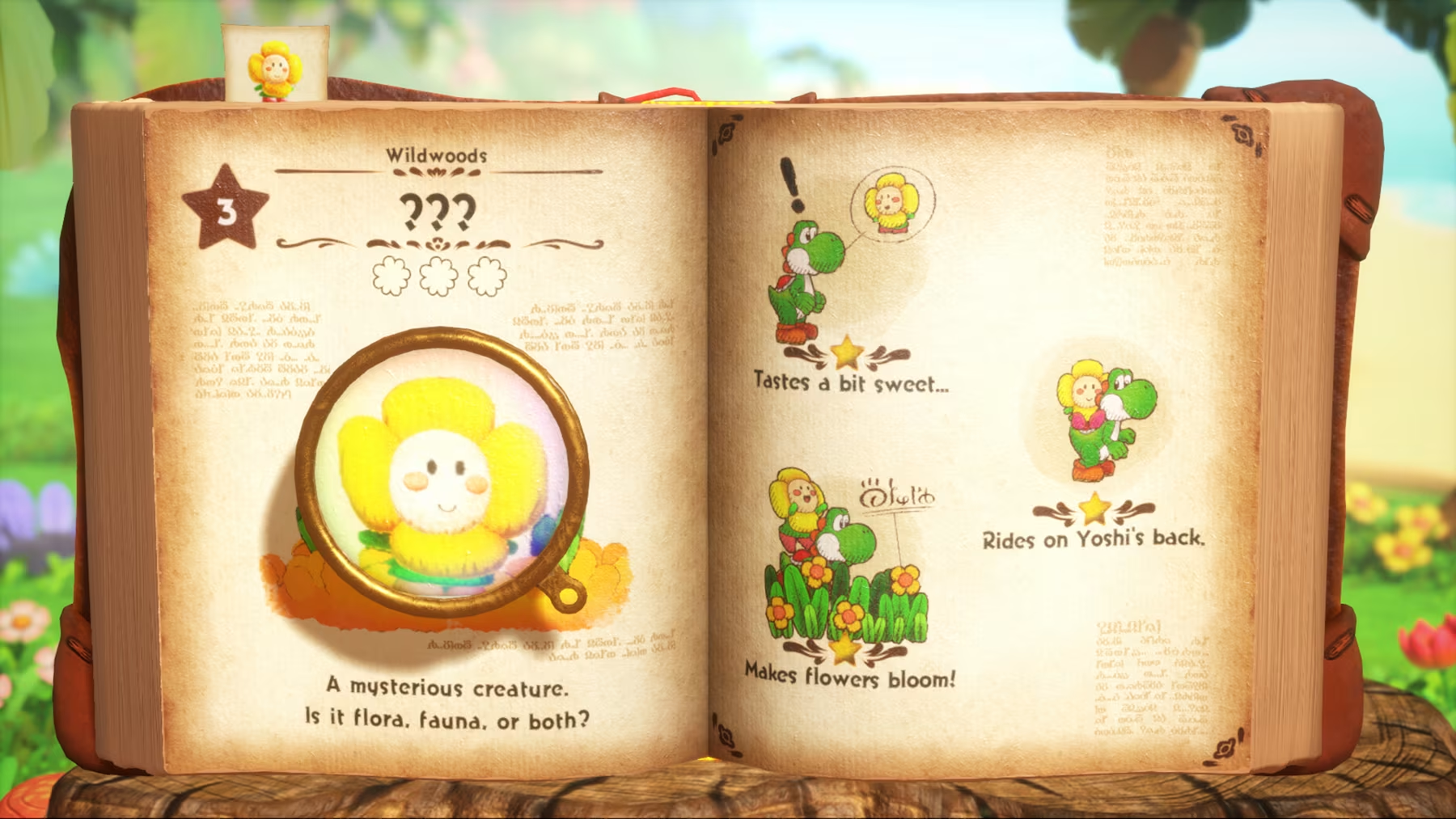
An image of the inside of a book with faded brown pages. The pages feature a daisy-like creature, along with how that creature helps Yoshi interact with the environment. This includes blurbs like "Makes flowers bloom," and "Rides on Yoshi's Back."

Mr. E cannot actually read the pages to learn about said creatures. You see… Mr. E’s eyes are on the front cover of the book, so the contents of his leather-bound body are a mystery! Yoshi agrees to help research the creatures by jumping into Mr. E’s pages and exploring.

Oh my gosh… Mr. E… Mystery. I just got that!

How Does Yoshi and the Mysterious Book Play?

Yoshi and the Mysterious Book arms Yoshi with a toolkit of moves that may be familiar to anyone that has played a Yoshi game in the past. Yoshi can jump, ground pound, and swallow creatures with his prehensile tongue. Yoshi and the Mysterious Book adds a “tail flick” to the arsenal, which hoists an enemy or creature onto Yoshi’s back when it makes contact.

Crazee Dayzee is rising on Yoshi's back in a storybook-like world. CrazeeDayzee is a daisy with little green legs and a smiling face. Behind the pair, text appears under a bed of flowers that says, "Makes flowers bloom!"

The objective is not to defeat enemies, but rather to learn about creatures. You and your kids can guide Yoshi to interact with creatures to unlock Discoveries. Let’s walk through how this works with an early creature called Crazee Dayzee.

As you experiment with Yoshi’s moves, you’ll unlock more information about Crazee Dayzee:

  • Crazee Dayzee is light, so it can ride on Yoshi’s back.
  • When Yoshi licks Crazee Dayzee we discover that it tastes sweet.
  • If Crazee Dayzee is on Yoshi’s back and they run past some budding flowers, they will bloom.

These are just a few of many Discoveries about Crazee Dayzee that Yoshi can record in the into Mr. E’s pages. You and your kids can then leverage how these creatures interact with the environments to traverse the world, unlock more creatures to research, and learn how each creature interacts with others within Mr. E’s pages.

With enough Discoveries, you and your kids will unlock additional chapters with more complex challenges and interactions between creatures.

As mentioned, most of the gameplay is not aggressive, and environments are intended to be explored rather than conquered. Yoshi does not have health and the creatures you find are not your enemies. Even so some creatures will go after Yoshi, but Yoshi will simply emit a little yelp if hit and carry on with adventuring.

Keeping Your Kids’ Discoveries Age-Appropriate

Setting your kids up for fun, age-appropriate experiences is not always the most straightforward process. Fortunately, there are tons of resources to help you streamline that.

Unsurprisingly, I always recommend checking the ESRB-assigned rating information first. The age and content ratings provide a great, familiar, and trustworthy look at what to expect from a video game. All games that are available physically (in a box that you’d order online or pick up in-person from a store) also have Rating Summaries, which provide a lot more contextual information about why a game received the rating it did.

Of course, sometimes you’ll want more information. For most games you can find gameplay videos, previews, trailers, and more with a quick internet search. Many games also have demos that you can play yourself to get some first-hand experience with a game before giving the green light to your kids.

We also recommend establishing some commonsense household rules around video games in your home. Talking to your kids about what they like about their favorite games will help you better understand which rules work for them. Check out ESRB’s Family Gaming Guide for some tips and conversation starters.

You can back these rules up with parental controls, too. All devices capable of playing video games offer parental controls settings. You can activate these to manage what your kids play (based on the ESRB rating information), when and for how long, with whom they can play online, and whether they can spend money on new games or in-game purchases. ESRB has step-by-step parental controls guides for many of the most popular consoles and devices at ParentalTools.org.

The post A Parent’s Guide to Yoshi and the Mysterious Book appeared first on ESRB Ratings.
A Parent’s Guide to Forza Horizon 6

Forza Horizon 6 at a glance:

  • Forza Horizon 6 is rated E for Everyone by the ESRB, with a Content Descriptor for Mild Lyrics.
  • Forza Horizon 6 costs $69.99 for the Standard Edition, but includes in-game purchases.
  • Forza Horizon 6 takes place in an open-world Japan, putting players in the driver’s seat of the Horizon Festival

You may remember, I am a “Car Guy,” so, Forza Horizon 6 is right in my wheelhouse. As a Car Guy, I know all the things; tires, fan belt, hub cap… pretty sure there are some tubes in there somewhere… what have you. But if you’re not a Car Person like me, you may need some more information to decide if Forza Horizon 6 is a good fit for your family.

You’ve come to the right place for tips to help you decide!

Is Forza Horizon 6 Appropriate for Your Kids?

Forza Horizon 6 is rated E for Everyone with a Content Descriptor assigned for Mild Lyrics. There are also Interactive Elements assigned for Users Interact (meaning players can communicate through the game) and In-Game Purchases (which lets consumers know that the game includes the ability to spend real-world currency on in-game content).

According to ESRB’s Rating Summary, “Some accompanying song lyrics contain the words ‘damn’ and ‘hell.’”

The E for Everyone rating signals to parents that the game is like appropriate for all ages from a content perspective. But that does not extend to a game’s minute-to-minute gameplay. Some elements of Forza Horizon 6 may be challenging for younger players, so it’s a good idea to do a little extra research if you’re still curious.

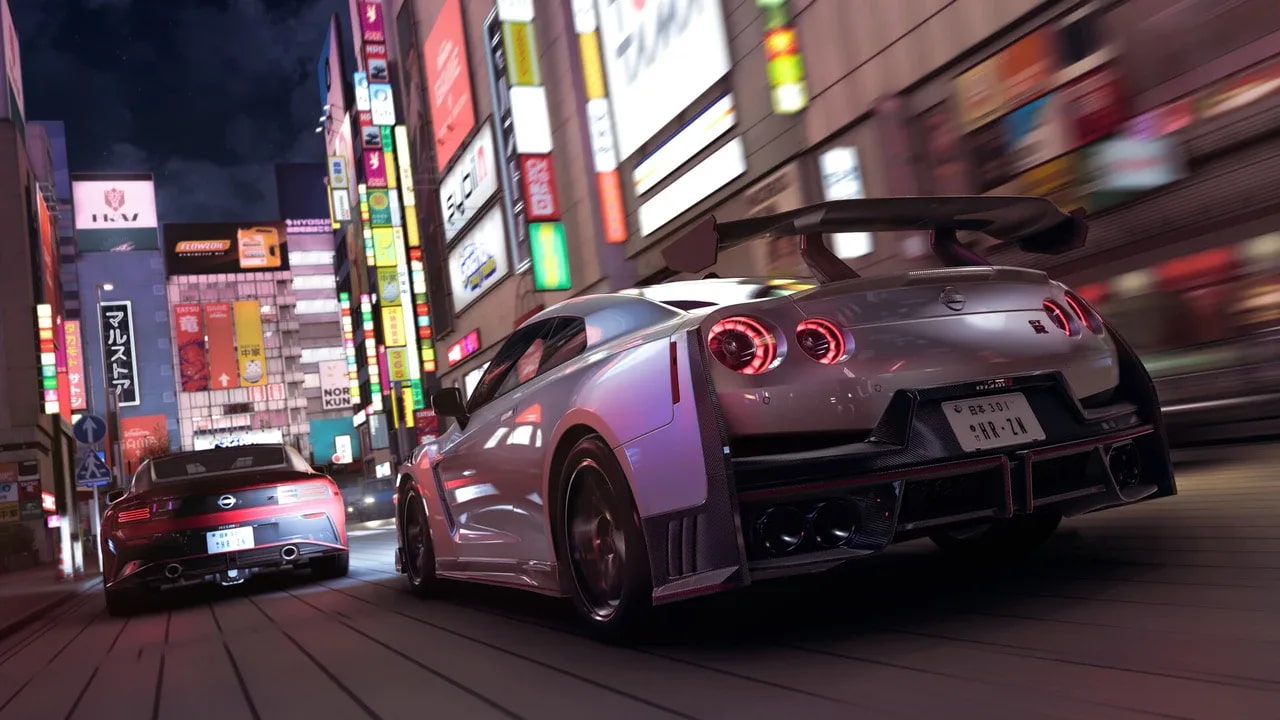
Two Nisan cars drive through Tokyo at night. Neon lights illuminate the city streets around the vehicles.

Where Can I Play Forza Horizon 6 and How Much Does It Cost?

Forza Horizon 6 is available on Xbox Series X|S, and PC, starting at $69.99 for the Standard Edition of the game. A PlayStation 5 release is expected to release later in 2026. In addition to the Standard Edition, two more versions of the game are also available:

  • The Forza Horizon 6 Deluxe Edition is $99.99 and includes:
    • Forza Horizon 6
    • Forza Horizon 6 Car Pass – 30 additional cars with one new car added to your in-game garage every week starting on release.
    • Forza Horizon 6 Welcome Pack – access to five Car Vouchers to trade for new cars and three tickets to redeem “Common” or “Rare” clothing items for your avatar.
  • The Forza Horizon 6 Premium Edition is $119.99 and includes:
    • Everything in the previous editions
    • Access to two future expansions for Forza Horizon 6
    • Forza Horizon 6 VIP – a permanent ticket providing access to boosts to race rewards, three exclusive cars, an in-game house (with a customizable garage), and more.
    • Forza Horizon 6 Time Attack Car Pack – Eight additional cars tuned for use in the game’s Time Attack Circuits.
    • Forza Horizon 6 Italian Passion Car Pack – four Italian cars to add to the in-game garage.

As mentioned, Forza Horizon 6 also includes the ability to spend real-world currency on cars, emotes, cosmetic items, and more. Make sure you activate parental controls around spending to block your kids from purchasing new games or in-game purchases without permission.

In addition to purchasing Forza Horizon 6 individually, you and your family can also download it with a subscription to Xbox Game Pass Ultimate. Xbox Game Pass is a tiered service that comes at varied prices offering different features, though the Ultimate tier ($22.99/month) is the only one that provides access to brand new first-party Xbox games. The “Premium” tier promises to add first-party games within the first year after release.  You can find out more about Xbox Game Pass here to make the most appropriate decision for your family.

What is Forza Horizon 6 About?

Like with all Forza Horizon games, you and your kids will be dropped into an open world with the objective of becoming the best racer in the region’s Horizon Festival. Forza Horizon 6 takes place in Japan, complete with in-game representations of big cities like Tokyo, as well as more rural areas.

Four cars are seen bursting through the start of a race in the Horizon Festival.

You and your family will start the game by entering into the Qualifiers for the Horizon Festivals as a no-name tourist. Soon, you’ll progress to the Invitational and finally land in the main Horizon Festival. As you and your kids progress through the story, you’ll earn access to new races, faster cars, new events, and more.

How Does Forza Horizon 6 Play?

Forza Horizon 6 is broken up into two main styles of play: the Campaign and Discover Japan.

Campaign

As a racing game a lot of the core gameplay in the Campaign portion of Forza Horizon 6 revolves around participating in racing events. The parameters of races vary, meaning you’ll have to pick certain cars depending upon whether the event in question is a Dirt, Road, or Cross Country race.

Winning the traditional races allows you and your kids to rise through the ranks, eventually earning access to Wristbands. These are essentially keys to unlock the next phase of the Campaign, complete with more challenging races and events. But they also allow access to more vehicles and customization options through the game. While racing may be the most straightforward way to rank up, there are other methods too.

You may stumble across a stretch of road asking you to drive as fast as you can, or another challenging you and your kids to drift as much as possible on a specific stretch of road. Participating in these more open-ended events not only helps progress to the next Wristband, but also earns earn XP (experience points). With enough XP, you’ll level up and get access to Wheelspins and Super Wheelspins to win credits, cars, cosmetics for your cars and in-game avatar, and more.

Eventually, you and your family will get invited to “Wristband Events” as a challenge to earn the next Wristband and progress through the campaign. Once you earn all seven available Wristbands you’ll be granted the title of Horizon Legend with access to the most challenging races and events in the game.

Two cars are seen drifting down a winding road in the Japanese countryside. Cherry blossom trees and other lush greenery are scattered around the perimeter of the roads.

Discover Japan

Having been to Japan a few years ago, I’ve not gone a single day without wanting to go back. My wife and I fell in love with the food, the vibes, the public transportation, the 7/11 egg salad sandwiches (look it up, it’s a thing!)… everything. That’s a 14-hour flight… not to mention the fact that we’ve since had a child who would probably explode if we subjected him to that amount of travel. So, the prospect of driving around Japan in Forza Horizon 6 as a virtual tourist in a super-fast car is appealing!

The Discover Japan mode removes many or the more prescribed boundaries from the progression of the Campaign, allowing you to lean into a more open-ended experience. Instead of car limitations in races, you’ll be able to drive in whatever your favorite cars are, wherever you please, and earn Stamps.

There are many smaller side-modes that can help you and your family progress to unlock your next Stamp. From collecting cars, to delivering food, to competing is special Street Races… you’ll have the opportunity to really explore however you and your kids want.

You’re not locked into either mode. You and your kids can choose whichever vibes are resonating with you that day.

Keep in mind that Forza Horizon 6 does facilitate online play with others. Fortunately, there are simple parental controls to help manage this! If this is important to you and your family visit ParentalTools.org for step-by-step guides to help you activate parental controls.

How To Make Sure Your Kids Have Video Game Airbags

Safety is important in all things. And while the risks of driving in a car without airbags are far greater than those of playing a video game without any boundaries, there’s no reason not to take advantage of every resource you can make sure those experiences are fun and appropriate. And fortunately, there are a lot of them!

Unsurprisingly, I always recommend checking the ESRB ratings first. The rating information, including Rating Category, Content Descriptors, and Interactive Elements, provide a comprehensive, high-level look at what’s in a game. If you need more information before making a decision, odds are you can find previews, videos, and trailers to answer any lingering questions. In some cases, games also offer demos, which you can play yourself to see if it’s appropriate for your kids.

Forza Horizon 6 also includes the ability to spend real-world currency on cars, emotes, cosmetic items, and more.

Overall, it’s also helpful to have some household rules around video game play. Starting with an ongoing, judgement-free conversation, you can learn what your kids love about video games, and come up with rules that both satisfy their passions while making sure appropriate boundaries in place. This may include time limits for play during the week, how much money they can spend on in-game purchases or new games (if any!), whether they can play online, and more. ESRB’s Family Gaming Guide has some helpful tips, guides, and conversation starters to get the ball rolling on establishing household rules.

Fortunately, you can back these household rules up with parental controls I mentioned earlier. Virtually all devices on which you can play video games also include parental controls settings. With these, you can manage what your kids play based on the ESRB age rating, when and for how long they can play, with whom (if anyone) they can play online, and whether they can spend money on new games or in-game purchases.

The post A Parent’s Guide to Forza Horizon 6 appeared first on ESRB Ratings.
A Parent’s Guide to Pokémon Pokopia

Pokémon Pokopia At a Glance

  • Pokémon Pokopia is rated E (Everyone) with Interactive Elements for Users Interact and In-Game Purchases.
  • Pokémon Pokopia on the Nintendo Switch 2 console for $69.99.
  • Pokémon Pokopia is a “life simulation” game set in the Pokémon universe where players will explore their surroundings, harvest materials, and (most importantly) befriend Pokémon to unravel mysteries.

As ESRB’s resident Pokémon Master, I’m ready for Pokémon Pokopia. This Pokémon spinoff (distinct from the many others like pinball, turn-based tactics games, dungeon crawlers, and more) brings the series into the simulation genre. Rather than stepping into the shoes of a Pokémon trainer, players will instead embody a Ditto on a mission to attract wild Pokémon back to a deserted region.

While still Pokémon, Pokopia plays nothing like the core games. Read on for more information to help you decide if Pokémon Pokopia is appropriate for your family.

Is Pokémon Pokopia Appropriate for Kids?

Pokémon Pokopia is rated E for Everyone, with no Content Descriptors. However, there are Interactive Elements assigned, including Users Interact (meaning players can communicate through the game) and In-Game Purchases (meaning users can use real money to purchase virtual currency that can be used to purchase in-game content).

According to ESRB’s Rating Summary Pokémon Pokopia “is a simulation game in which players assume the role of a Pokémon that works to transform a desolate world into a thriving habitat. As players interact with characters, they can collect resources, fulfill requests, and build various landscapes.”

Keep in mind that ESRB ratings are intended to help you decide if a game is appropriate for your kids from a content perspective. In other words, Pokémon Pokopia is likely appropriate for your family given its E for Everyone rating, but some younger players may struggle to manage some of the more complex gameplay systems by themselves. Having said that, if you decide that Pokémon Pokopia is appropriate for your kids, it’s a great opportunity to play together regardless of age!

Where Can I Play Pokémon Pokopia and How Much Does It Cost?

Pokémon Pokopia is available for the Nintendo Switch 2 and retails for $69.99 physically and digitally. As mentioned, the ESRB rating also includes the Interactive Element for In-Game Purchases. This means that there may be additional options to spend real-world currency on in game content (items, DLC, etc.).

Make sure you check that you’ve set parental controls to manage spending on the console!

What is Pokémon Pokopia About?

In Pokémon Pokopia, the player awakens in the gooey pseudopods of a Ditto, a Pokémon with the ability to transform into any other Pokémon. This Ditto, however, has apparently been napping for a long, long, long time. Its trainer is nowhere to be seen, and its surroundings are unrecognizable.

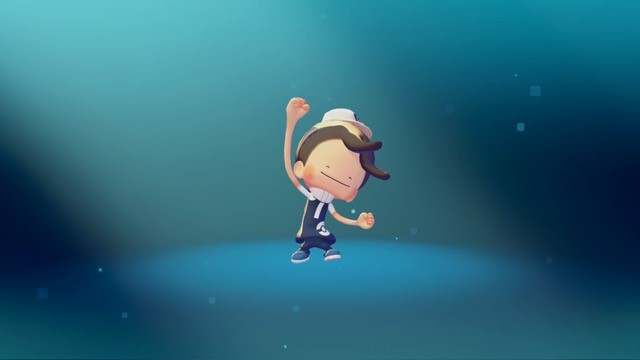
The game begins with Ditto transforming into its best approximation of its trainer to ask around if anyone has seen them. This also acts as a sort of character customization for the player – allowing you and your kids to pick hair, clothes, and other visual elements of Ditto’s trainer.

If you’re familiar with Ditto, you may know that its transformations are… not always exact. For example, here’s my Ditto, which I created to approximate yours truly (it’s flawless!):

A ditto impersonating a human in Pokemon Pokopia.

Ditto soon discovers that the they have woken up in a dilapidated Kanto region (the explorable continent from the original Pokémon games). It is completely devoid of all life… save for one Pokémon: Professor Tangrowth. The Professor informs Ditto that the humans are long gone (though they don’t know why) and the Pokémon that once packed the region’s tall grass and caves have gone into hiding.

Luckily, Professor Tangrowth has some thoughts on Ditto can attract other Pokémon to the region and hopefully unravel the mystery of what exactly happened!

How Does Pokémon Pokopia Play?

In Pokémon Pokopia, you and your family will explore, harvest resources from your surroundings, create habitats for Pokémon, and build structures. In this “life simulation” game, your major goal is to attract as many new Pokémon as possible, keep them happy, and level up the environment to expand your array of craftable structures, items, decorations, and more.

All of these mechanics build on each other to allow you and your family with (quite literally) hundreds of options to customize each environment throughout the game.

The general loop will go like this:

Discover Clues to New Habitats

Ditto will find clues around the environment or via the in-game Pokédex that outline habitats that will attract new Pokémon. This can be something like cultivating patches of tall grass in a certain way, crafting/placing items or in a specified pattern, building structures near bodies of water, and more. Some habitats can be significantly more complicated than others but may attract rare Pokémon with valuable skills.

The player has organized four patches of wildflowers to create a habitat and attract Eevee in Pokémon Pokopia.

Meet a New Pokémon

If you nail the habitat requirements, you’ll attract a new Pokémon resident to the area! Hooray! Some of your Pokémon residents will teach Ditto a new move, while others may will open up new avenues to interact with and mold the environment. For example, your Ditto will  learn Water Gun from a Squirtle to water plants and hydrate soil. Meanwhile, you’ll need a Timburr (or another Pokémon with a “build” skill) to build houses and other structures.

Some Pokémon will even teach Ditto an entirely new transformation.

Use What You’ve Learned

Moves, skills, and transformations offer new ways for Ditto to traverse and manipulate the environment. Eventually, you and your family will use these skills and moves in concert to build homes, infrastructure, and more. Eventually, all these systems intersect and layer, allowing you and your family to think outside of the box and use your collective imagination to mold the region as you see fit.

Be a Good Friend and Level Up Your Environment

The Pokémon that move into your region also have “requests.” Pokémon will ask Ditto to help them out with something, be it a new piece of furniture for their habitat, or an entirely new habitat altogether! My Charmander buddy asked for a literal new house. In this market, Charmander?!

Anywho… Satisfying the request will increase the Pokémon’s comfort, and in turn raise the Environment Level.

As the Environment Level of the area increases Ditto and your family will unlock new customization options, recipes, items, and more. Which can all be purchased in the in-game shop.

The in-game store in Pokémon Pokopia. There are squares containing options to purchase in-game items like a bench, a mirror, and more using in-game currency.

For the record, this shop uses in-game currency earned from challenges (collecting a number of a specific resource, finding a number of unique Pokémon, etc.). During my play time I did not see any option to make a purchase with real world currency.

Single Player and Multiplayer

Pokémon Pokopia can be played both in single player and multiplayer. Up to four players can collaborate on an island at one time, so if you have the number of devices to support that, it could be a fun, age-appropriate experience for an entire family. Otherwise, you and your kids can join a shared, online territory with friends and family members. This is a more open-ended experience, with no real objectives other than whatever your kids’ imagination dreams up.

It also takes advantage of Nintendo’s GameShare, which allows one player to share a game with friends and family without needing more than one copy of a game. If you live in a house with multiple Nintendo Switch consoles, you and your family can all play together wirelessly. To be clear, a Nintendo Switch 2 is needed to “host” the game, but with GameShare it can be streamed to a Nintendo Switch console as well.

Despite the inclusion of both local and online multiplayer, your kids cannot communicate with others directly when playing the game online. Even so, I always recommend activating parental controls around communication as a backup. And remember… discuss with your children how to safely use platforms like Discord if they plan to chat with their friends off platform.

Making Sure Your Kids’ Video Game Expeditions are Safe and Appropriate

I always like to say that checking the ESRB rating before buying or downloading a game is a perfect first step. While many parents may get exactly what they need from a rating to decide, some parents may want more information. If you’re still on the fence, there are likely dozens of previews, reviews, trailers, and gameplay videos available for most titles that can give you a more in-depth look at the moment-to-moment gameplay. Some games even have demos that you can try out yourself!

When it comes down to it, there’s no better way to keep an eye on your kids’ games than staying involved! ESRB’s Family Gaming Guide has tips to help you start and maintain an ongoing conversation about what your kids are playing and why they love it. Keeping it judgement-free will also help your kids understand that you’re on their side, and they can come to you if they ever have any questions or concerns about something they’ve experienced while playing… be it alone or online with others.

From there, you can also establish some commonsense household rules around video games to outline things like spending and play time limits. To back up those rules, virtually every video game device also has parental controls to help you manage what your kids play, when and for how long, with whom, and whether they can spend money on in-game purchases or new games. Visit ParentalTools.org for step-by-step parental controls guides.

The post A Parent’s Guide to Pokémon Pokopia appeared first on ESRB Ratings.

Received before yesterday

Rating Category Breakdown: 90% of Games Rated in 2025 Are Age-Appropriate for Your 13-Year-Old

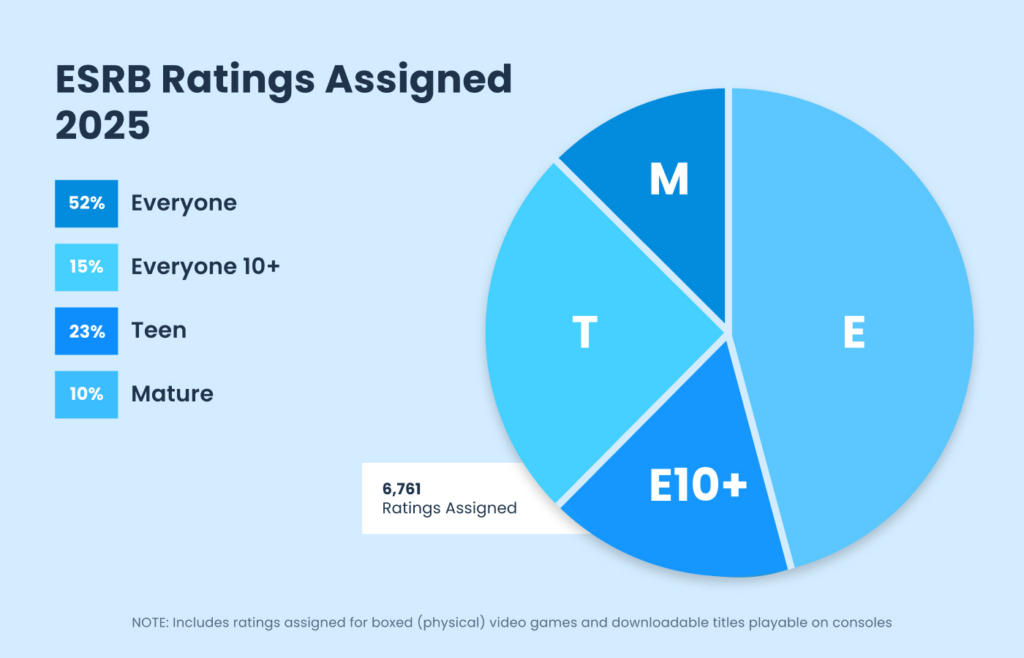
Like literally every year in the past, E for Everyone is the most assigned Rating Category for physical and console downloadable games in 2025. Not only that, but last year E for Everyone accounted for more than 50% of the more than 6,500 ratings assigned.

Read on for more about our Rating Category stats from 2025.

ESRB's Rating Category Breakdown for ratings assigned to physical and console downloadable games in 2025: E for Everyone - 52% E10+ for Everyone 10+ - 15% T for Teen - 23% M for Mature - 10%

E (Everyone)

52% of all ratings assigned to physical and console downloadable games in 2025 were rated E for Everyone. This means that more than 3,500 games rated in 2025, including many of the most popular ones, are appropriate for the whole family!

E10+ (Everyone 10+)

ESRB assigned Everyone 10+ to 15% of the games rated in 2025. This means about 67% of the games released (or rereleased) throughout the year may be appropriate for your 10-year-old!

T (Teen 13+)

Just like in 2024, 23% of the games rated last year were assigned T for Teen in 2025. This amounts to more than 1,550 physical and console downloadable games. Combined with E for Everyone and Everyone 10+, this means that 9 out of every 10 games rated in 2025 were appropriate for your 13-year-old!

M (Mature 17+)

M for Mature is historically the least frequently assigned rating category, and 2025 continued that trend. ESRB assigned 10% of the physical and console downloadable games and M for Mature rating. This is 2% lower than 2024, and the lowest percentage since 2019.

How Can You Manage Your Kids’ Video Games?

Checking the ratings is a great first step to help decide if a game is appropriate for your family. Sometimes the ESRB-assigned rating information is all you’ll need, but if you’re still on the fence there are many resources readily available to find more information.

  • Check all three parts of the rating – Parents tell us that all three parts of the ESRB rating system are important so don’t forget to check a game’s Content Descriptors and Interactive Elements. Content Descriptors provide additional information about what led to a game’s age rating, such as language, violence, humor, and more. Interactive Elements let you know when a game has the ability for players to communicate via voice chat, text, user generated content, and more.
  • Check the Rating Summary – Physical games all have Rating Summaries that provide more detailed information about what led to a rating assignment. You can find these by searching for a game on ESRB.org or the ESRB App (for Android and iOS).
  • Visit ESRB’s Family Gaming Guide – For more information about picking appropriate games, maintaining your kids’ online privacy, managing screen time, and more, ESRB’s Family Gaming Guide has you covered.
  • Additional research – Any game that your kids may be clamoring for will have some video available to watch online. This may come in the form of a trailer, gameplay videos, “let’s plays” with streamers, and more. Websites like YouTube and Twitch can be a great resource to learn more about a game before purchasing or downloading for your kids.  And we always recommend that you play games with your kids, which is a great way to better appreciate their experiences…and have a great time.
  • Set parental controls – Virtually all video game devices include the ability to activate parental controls. These give you the ability to manage which games your kids play based on the rating, when and for how long they can play, whether they can communicate online with others, and how much money they can spend (if any!) on new games or in-game purchases. ESRB provides free, step-by-step parental controls guides here.

And remember: ESRB ratings are here to suggest the age-appropriateness of a game. There can still be games that are too complex or challenging for your younger kids, regardless of their ratings. So, double-check with a few minutes of additional research to make sure your family has as much fun as possible with their next video game, including playing games together as a family


The post Rating Category Breakdown: 90% of Games Rated in 2025 Are Age-Appropriate for Your 13-Year-Old appeared first on ESRB Ratings.

A Parent’s Guide to Gorilla Tag

Any parent or teacher with kids under the age of 14 are probably already aware, but millions of young gamers are hurtling headfirst into Gorilla Tag, an online, multiplayer VR game with constantly changing game modes. Are your kids ready to become a “monke” (the name for in-game characters) and engage in fast-paced, physical tag? Read on to find out.

Is Gorilla Tag Appropriate for Kids?

Gorilla Tag is rated E for Everyone with a Content Descriptor for Mild Fantasy Violence. The rating for Gorilla Tag also includes two Interactive Elements: Users Interact (meaning players can communicate through the game) and In-Game Purchases (meaning users can use real money to purchase virtual currency that can be used to purchase in-game content).

In its most basic form, Gorilla Tag is a cartoony, heightened game of virtual tag. However, according to the ESRB assigned Rating Summary, “monkes” can use “slingshots or cartoony bows-and-arrows to damage combatants,” which is obviously quite different than traditional tag. Damage is displayed visually in tame ways, such as popped balloons or characters slowing down.

Even if the content sounds appropriate, remember that Gorilla Tag is a VR game. Most VR headset manufacturers recommend that headsets be used only when kids are 13 or older. Meta has options for parent-managed and supervised accounts, and Gorilla Tag uses those features in-game by restricting users’ ages. Gorilla Tag uses k-ID age verification to determine a player’s age and, where appropriate, require parental consent before granting access to communication features, social interactions, and certain in-game purchase options. Younger players may require parent or guardian involvement during verification. These measures all help to make sure your kids’ information stays private and ensure that you (as the parent and decision-maker) are involved in and aware of your kids’ video game experiences.

It’s a good idea to check the user manual for any VR headset you own to also see if there are any recommended age restrictions. Of course, the final decision is always up to you!

Where Can I Play Gorilla Tag and How Much Does it Cost?

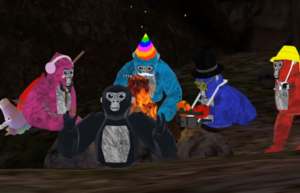
Gorilla Tag is a free-to-play VR game available on PlayStation VR2, Meta Quest 2, Meta Quest 3, and Meta Quest Pro. It can also be purchased through Steam for $19.99 to play on PC VR. Five “monkes” sit by a campfire in a game of Gorilla Tag.
Five "monkes" sit by a campfire in a game of Gorilla Tag. From Left to right: pink monke, black monke, turquoise monke, blue monke, brown monke.

On most platforms Gorilla Tag doesn’t cost anything to download and play, but it does include offers for users to purchase in-game cosmetics. These include things like hats, sunglasses or makeup, clothing, gloves, held items, and more.

Cosmetics are exchanged for the in-game currency, called Shiny Rocks. Players have the option to purchase Shiny Rocks from an in-game ATM. Players can purchase Shiny Rocks through various bundles, typically priced between $5 and $40, with available options subject to change.

As with most free-to-play games, in-game purchases are entirely optional. Even if you and your family do not want to spend money on Shiny Rocks, players earn 100 Shiny Rocks when they log in each day. It’s always a good idea to discuss your household rules around in-game purchases with your kids, and back them up with parental controls (more on that later!).

How Does Gorilla Tag Play?

Gorilla Tag includes several game modes with the core mechanic being to avoid a tagger. From a first-person perspective, players move by pumping their arms (like a running gorilla!) to run, climb, and jump through the environment.

Infection

Gorilla Tag’s default game mode drops at least 4 players (and up to 10 players) into a level with one monke being chosen at random as infected. The infected monke, also known as the “lava monke,” must chase the other players in an effort to tag them. However, unlike real tag, instead of being “out,” the tagged monkes are also infected and will join the original lava monke in hunting down the uninfected players. The game ends when everyone gets tagged, at which point a new game starts with a new lava monke. In addition to Infection as the core mode, Gorilla Tag offers newer modes and experiences, including Ranked Mode, community-created maps through Share My Blocks, and updated hub areas like Hoverpark.

Hunt

A four-player mode that gives each player a “target” to hunt. Once the game begins, each player is given a hunt watch that displays information about their unique target (one of the other players). This includes things like the color of the monke, the player’s username, cosmetic information, and more. Players will then try to tag their target – which is kept secret from other players – while simultaneously trying to avoid the player hunting them. When tagged, players become an “ice monke” who can tag other players, slowing down their run speed and making it easier for their pursuer to catch them. The game ends when there are only two hunters left.

As with most free-to-play games, in-game purchases are entirely optional.

Paintbrawl

Monkes start this game on a team of either orange or blue. Each monke is given a slingshot with paintballs to fling at the monkes on the other team. Each monke can be hit three times before getting out – this is visually represented by three balloons floating on each monke’s back. When a monke loses all of their balloons they are no longer able to pop their opponent’s balloons, but they can continue to use their slingshots to fatigue and slow down their adversaries. The game ends when all the monkes on a team lose their balloons.

Casual

This is a non-competitive game mode to chat with friends outside of the regular gameplay. There are no core objectives, and players can simply communicate via voice chat (if you permit that) with friends and others.

The Share My Blocks feature enables players to access custom, community-created maps, indicating that some in-game content is user-generated. Additionally, Gorilla Tag regularly introduces seasonal maps and events, such as winter, holiday, or themed updates, which change environments and activities throughout the year.

Managing Your Monkes Like a Pro

VR can be a new and exciting place for kids to play, especially when it has the added benefit of being a very physically active and social game like Gorilla Tag. In 2025, Gorilla Tag even added an in-game friending system, allowing players to add friends directly within the game without relying on external platforms. This is part of why it’s so important to stay looped into your kids’ video game interests, and to work with them to make sure they’re monke-ing around in an appropriate environment.

Checking the ESRB-assigned rating information is always a great first step. But there’s no better way to understand a game than trying it out for yourself. But there’s no better way to understand a game than trying it out for yourself. Of course, doing a little bit of research – especially watching videos and streams – can give you a great idea of what a game is all about.

Setting household rules is also a great way to keep an ongoing, judgement-free conversation around video games active in your home. You can find some tips about starting that talk by visiting our Family Gaming Guide.

Setting parental controls, which can apply at the account level and affect communication features and purchasing access based on a player’s age and verification status, is a great way to support your household rules. On Meta Quest, parents can enable dedicated child accounts for kids ages 10 to 12 and supervision settings for teens age 13 and up. These tools activate automatic restrictions in Gorilla Tag for features like voice chat, social interaction, and spending.

This is also true for PlayStation VR2, which requires a PlayStation 5 to play. These settings allow you to manage what your kids play, when and for how long, with whom, and whether they can spend real world currency on in-game purchases (or other new games). You can find step-by-step parental controls guides at ParentalTools.org.

The post A Parent’s Guide to Gorilla Tag appeared first on ESRB Ratings.

PBS accounts for nearly half of first graders’ most frequently watched educational TV and video programs

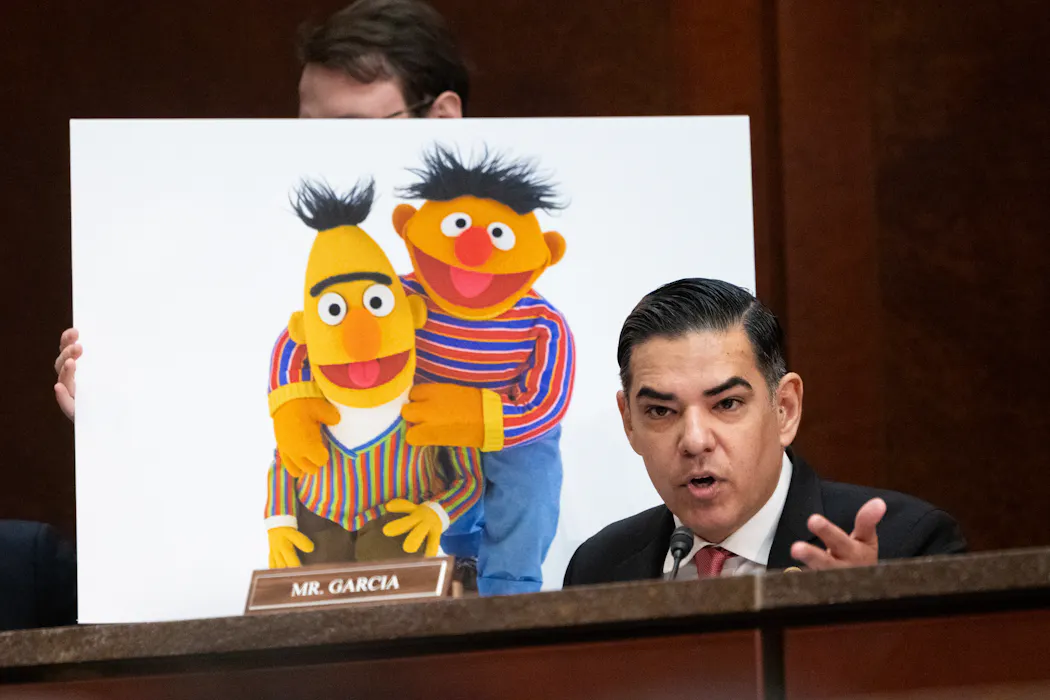
Rep. Robert Garcia, a California Democrat, speaks during a House hearing in March 2025, months before Congress rescinded two years of public media funding. Nathan Posner/Anadolu via Getty Images
CC BY-ND

At U.S. President Donald Trump’s request, Congress voted in July 2025 to claw back US$1.1 billion it had previously approved for the Corporation for Public Broadcasting. That measure, which passed in the House and the Senate by very narrow margins, will cut off all federal tax dollars that would have otherwise flowed to PBS and its affiliated TV stations for the next two fiscal years.

The public media network has played a crucial role in producing educational TV programs, especially for children, for nearly 60 years. It has been getting 15% of its budget in recent years from the federal government. Many of its affiliate stations are far more reliant on Washington than that – leading to a flurry of announcements regarding planned program cuts.

Sesame Street” is still in production, joined by newer TV shows like “Wild Kratts” and “Daniel Tiger’s Neighborhood.” PBS KIDS, in addition to producing popular age-appropriate programs, has a website and multiple apps with games and activities that provide other opportunities for learning.

Local PBS affiliate stations offer educational programming and other resources for schools, families and communities.

I’m a child development researcher studying how kids engage with digital media and how educational programming and other kinds of content help them learn. I also have two children under 5, so I’m now immersed in children’s media both at work and at home.

What kids watch

In a study about the kinds of media kids consume that the Journal of Applied Developmental Psychology published in June 2025, my colleagues and I surveyed the parents and other kinds of caregivers of 346 first graders. The study participants listed the TV shows, videos, apps and games the kids used the most.

Our research team then used a systematic coding process to look at how much children access educational programming in their favorite media – whether it’s through their favorite TV shows, web videos or video games.

We found that only 12% of this content could be described as educational. This amount varied widely: For some children, according to the adults we surveyed, educational media comprised their top three to five sources. Others listed no educational media consumption at all.

We also looked into who is taking advantage of educational media.

Our team found no differences in kids’ educational media use according to how many years of education their parents had. That finding suggests that kids of all backgrounds are equally likely to consume it.

A tween boy plays a videogame with two screens.
The vast majority of the media that kids consume has little educational value. Neilson Barnard/Getty Images

The Role of PBS

This peer-reviewed study didn’t break down our results by specific media outlets. But in light of the cessation of federal funding, I wanted to find out how much of the educational content that children watch comes from PBS.

By revisiting our data with this objective in mind, I learned that PBS accounted for 45% of the educational TV or videos parents said their kids watched most often. This makes PBS the top source for children’s educational programming by far. Nickelodeon/Nick Jr. was in second place with 14%, and YouTube, at 9%, came in third.

PBS accounted for a smaller portion, just 6%, of all educational apps and games. I believe that could be because a few non-PBS apps, like Prodigy and i-Ready, which can be introduced in school, dominate this category.

‘Daniel Tiger’s Neighborhood,’ a cartoon, will seem familiar to anyone who grew up watching ‘Mr. Rogers’ Neighborhood.‘

An Uncertain future

Independent production companies collaborating on programming with PBS consult experts in child development and children’s media and conduct research throughout the production process to see how children respond and learn, often in partnership with PBS KIDS.

This rigorous production process can include observing children watching the show, conducting focus groups and surveying parents about their experiences. It requires a lot of time and money to produce this kind of thoughtfully crafted educational media. This process ensures that the programming is both fun for children and helps them learn.

What the end of federal funding will mean for PBS’ educational programming for kids is still unclear. But to me, it seems inevitable that my children – and everyone else’s kids – will have fewer research-informed and freely accessible options for years to come.

At the same time, there will likely be no shortage of flashy and shallow content marketed to kids that offers little of value for their learning.

The Conversation

Rebecca Dore has conducted previous consulting work for PBS KIDS and engages with a PBS KIDS staff member who is a member of the advisory board for one of Dore's current federally funded grants.

Distrust in AI is on the rise – but along with healthy scepticism comes the risk of harm

PlayStation/StaminaZero/YouTube

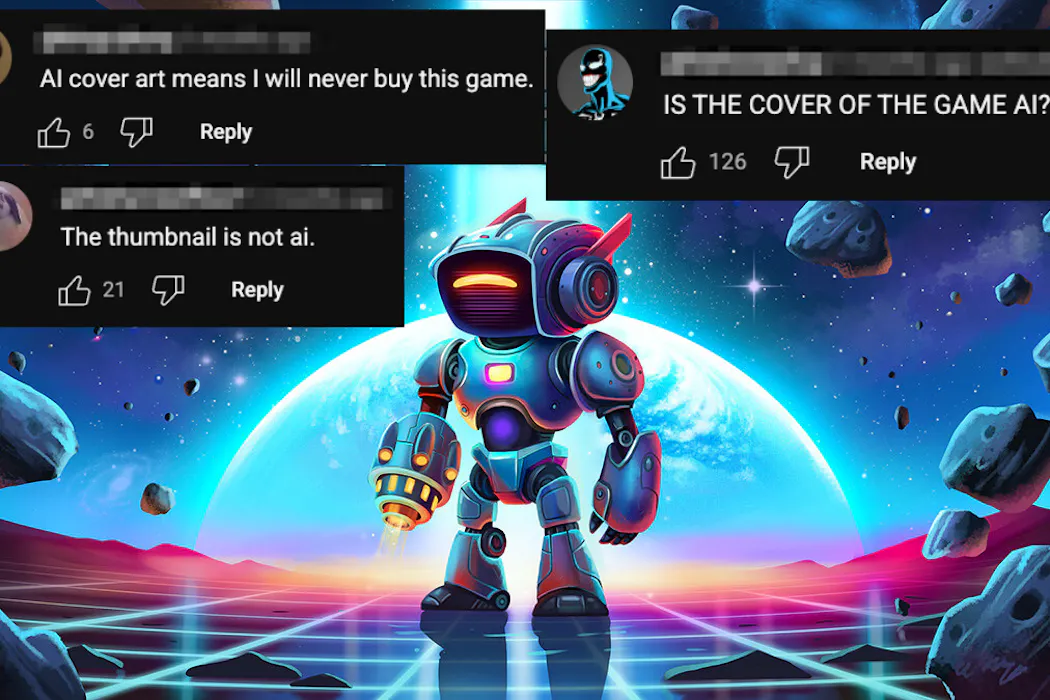
Some video game players recently criticised the cover art on a new video game for being generated with artificial intelligence (AI). Yet the cover art for Little Droid, which also featured in the game’s launch trailer on YouTube, was not concocted by AI. It was, the developers claim, carefully designed by a human artist.

Surprised by the attacks on “AI slop”, the studio Stamina Zero posted a video showing earlier versions of the artist’s handiwork. But while some accepted this evidence, others remained sceptical.

In addition, several players felt that even if the Little Droid cover art was human made, it nonetheless resembled AI-generated work.

However, some art is deliberately designed to have the futuristic glossy appearance associated with image generators like Midjourney, DALL-E, and Stable Diffusion.

Stamina Zero published a video showing the steps the artist took to create the cover art.

It’s becoming increasingly easy for images, videos or audio made with AI to be deceptively passed off as authentic or human made. The twist in cases like Little Droid is that what is human or “real” may be incorrectly perceived as machine generated – resulting in misplaced backlash.

Such cases highlight the increasing problem of the balance of trust and distrust in the generative AI era. In this new world, both cynicism and gullibility about what we encounter online are potential problems – and can lead to harm.

Wrongful accusations

This issue extends well beyond gaming. There are growing criticisms of AI being used to generate and publish music on platforms like Spotify.

Yet as a result, some indie music artists have been wrongfully accused of generating AI music, resulting in damage to their burgeoning careers as musicians.

In 2023, an Australian photographer was wrongly disqualified from a photo contest due to the erroneous judgement her entry was produced by artificial intelligence.

Writers, including students submitting essays, can also be falsely accused of sneakily using AI. Currently available AI detection tools are far from foolproof – and some argue they may never be entirely reliable.

Recent discussions have drawn attention to common characteristics of AI writing, including the em dash – which, as authors, we often employ ourselves.

Given that text from systems like ChatGPT has characteristic features, writers face a difficult decision: should they continue writing in their own style and risk being accused of using AI, or should they try to write differently?


Read more: Google’s SynthID is the latest tool for catching AI-made content. What is AI ‘watermarking’ and does it work?


The delicate balance of trust and distrust

Graphic designers, voice actors and many others are rightly worried about AI replacing them. They are also understandably concerned about tech companies using their labour to train AI models without consent, credit or compensation.

There are further ethical concerns that AI-generated images threaten Indigenous inclusion by erasing cultural nuances and challenging Indigenous cultural and intellectual property rights.

At the same time, the cases above illustrate the risks of rejecting authentic human effort and creativity due to a false belief it is AI. This too can be unfair. People wrongly accused of using AI can suffer emotional, financial and reputational harm.

On the one hand, being fooled that AI content is authentic is a problem. Consider deepfakes, bogus videos and false images of politicians or celebrities. AI content purporting to be real can be linked to scams and dangerous misinformation.

On the other hand, mistakenly distrusting authentic content is also a problem. For example, rejecting the authenticity of a video of war crimes or hate speech by politicians – based on the mistaken or deliberate belief that the content was AI generated – can lead to great harm and injustice.

Unfortunately, the growth of dubious content allows unscrupulous individuals to claim that video, audio or images exposing real wrongdoing are fake.

As distrust increases, democracy and social cohesion may begin to fray. Given the potential consequences, we must be wary of excessive scepticism about the origin or provenance of online content.

A path forward

AI is a cultural and social technology. It mediates and shapes our relationships with one another, and has potentially transformational effects on how we learn and share information.

The fact that AI is challenging our trust relationships with companies, content and each other is not surprising. And people are not always to blame when they are fooled by AI-manufactured material. Such outputs are increasingly realistic.

Furthermore, the responsibility to avoid deception should not fall entirely on internet users and the public. Digital platforms, AI developers, tech companies and producers of AI material should be held accountable through regulation and transparency requirements around AI use.

Even so, internet users will still need to adapt. The need to exercise a balanced and fair sense of scepticism toward online material is becoming more urgent.

This means adopting the right level of trust and distrust in digital environments.

The philosopher Aristotle spoke of practical wisdom. Through experience, education and practice, a practically wise person develops skills to judge well in life. Because they tend to avoid poor judgement, including excessive scepticism and naivete, the practically wise person is better able to flourish and do well by others.

We need to hold tech companies and platforms to account for harm and deception caused by AI. We also need to educate ourselves, our communities, and the next generation to judge well and develop some practical wisdom in a world awash with AI content.

The Conversation

The authors do not work for, consult, own shares in or receive funding from any company or organisation that would benefit from this article, and have disclosed no relevant affiliations beyond their academic appointment.

❌