
41 Things That Stuck With Us in 2025
Aunt Gladys. Tyler, the Creator. That sex scene in “The Naked Gun.” These are the things Culture staffers couldn’t stop thinking about this year.


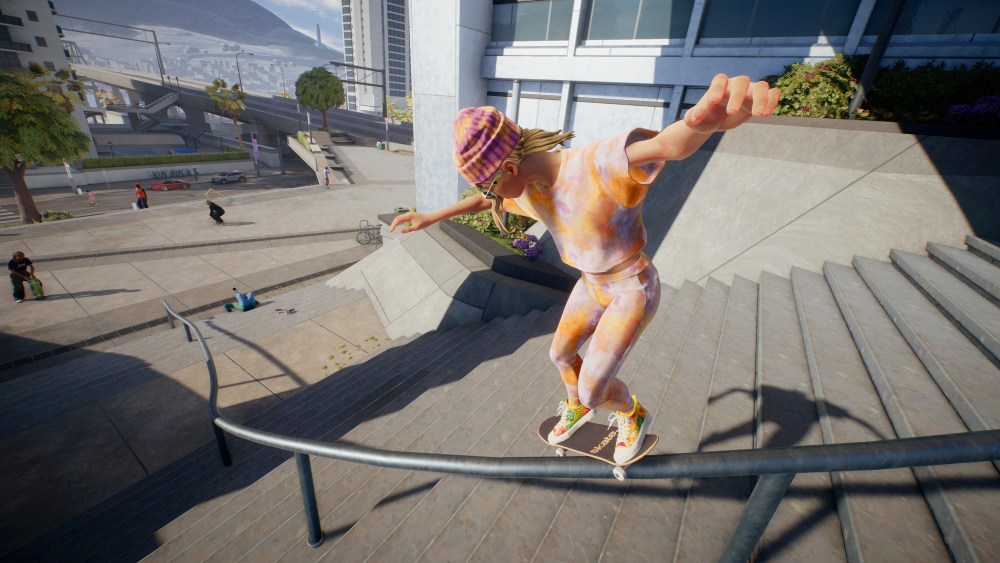
Skate‘s Season 2 update is meant to push the free-to-play title toward a grittier, more realistic visual identity. But players say the game’s new character models have landed somewhere far stranger. After checking in with their in-game avatars following Thursday’s patch, many fans are claiming their skaters look dramatically worse, with harsher skin textures, darker tones, and mismatched hair, among other things. Personally, my player is looking a bit worse for wear as well.
A Reddit thread published on Tuesday quickly became the hub of complaints, gathering hundreds of comments from frustrated players sharing before-and-after screenshots and commiserating over the overhaul. The OP’s comparison image shows softer, stylized faces replaced by characters with heavily shadowed eyes, harsher wrinkles, and darker, blotchy skin. Honestly, it’s a bit uncanny and doesn’t seem to be what Full Circle foresaw when planning on updating Skate‘s visuals.

Across the thread, players describe an inconsistent, sometimes severe shift in appearance depending on complexion and gender. The issues seem to disproportionately affect female avatars as well, with one user writing, “Girl characters look like they have really bad hangovers,” while another harshly joked that their skater “became addicted to meth in a matter of an hour.” It seems that during development, Full Circle eliminated paler tones when it came to character creation.
Not all feedback is negative. A handful of users said their characters look “more realistic,” and some who already had darker complexions reported smaller differences. But even supportive comments generally acknowledge that the new models still have mismatched or outdated hair textures, harsher shading around the nose and eyes, and a style that clashes with the rest of the game.
The debate speaks to a broader tension in Skate‘s art direction. Some players previously criticized the game’s original “cartoonish” look, while others felt the series’ goofy, physics-driven identity didn’t need realism at all. The Season 2 update seems to satisfy neither camp. In my review of Skate, I noted that the Fortnite-like visuals quickly faded into the background after a short time. And because the game is overtly over-the-top and goofy, it’s really not a big deal. That said, I have no earthly idea what the devs were thinking with this new look.
Will the complaints be enough to force yet another change? I’m not sure, but it’s certainly funny to read!

Skateboarding is a matter of precision, skills, and showing off. You can master every head-turning move, but without an audience, you won’t be able to flaunt it. And if you are performing them virtually in a game like Skate, there’s no audience to witness your unicorn of a trick unless it’s captured and posted online.
For that, getting into replays is your best bet. After all, it’s not just skateboarding games — sports titles in general deserve a decent mechanic where getting into the meat and potatoes of your highlight moments is possible. Luckily, with the Season 2 update, EA has got you covered.
Skate players are in for a treat as the game now offers an all-new replay editor. Whether it’s just an ollie over the bench or a full street line, this fresh addition makes any scene cinematic. While it’s not as complex as a full-fledged video editor, here’s a quick tour of all the tools it offers.
Before firing up the replay editor, keep in mind that only the past 15s, 30s, 1 minute, 2 minutes, and 5 minutes of the gameplay will be available for you to revise. If the desired moment sits within this time range, then you are good to proceed.
The fastest way to access the editor is by holding the View or Create button. Once you prompt the main screen, it will show basic editing options. As the basics are self-explanatory, we’ll focus on advanced editing tools. Press X or Square to gain command over advanced tweaks.
Since you won’t be editing the whole 60 seconds anyway, the first thing the editor greets you with is the “Trim” menu; you can also access it in the basics section by pressing R1 or RB.
Here, you’ll have a complete 1-minute timeline that can be shortened to the desired scene. Just put a starting point with D-Pad left and an ending point with D-Pad right to select the part you want to edit. After that, press the right bumper again to jump to the real deal, the Keyframes.
Now this is where all the magic happens. The game allows you to put keyframes on the timeline, each bringing a unique type of shot with it. With decent camera options and adjustments, the replay editor can really tap into the cinematographer in you. Players can access the following options by pressing X or Square.
Those were all the camera controls. After choosing your desired layout and changes, the next part is to add keyframes. Simply hover on the timeline and put a keyframe by pressing the D-Pad down.
The layout you planned is saved till this key point. For the next shot, make changes to your view and proceed to the end of it, and simply add another keyframe. These two keys, once played, will show different shots in the same footage. You can keep adding more keys to add more creativity, or jump to the next and final part, exporting.
With all the keyframes finalized, the last step is to export your footage. Here, you have the following things to consider before getting the video:
Once you have chosen your desired format, frame rate, and resolution, press the View or Create button to open drafts. From here, just press X or Square and wait till your footage exports.
That’s it for this new, cool feature. You can also head to the editor’s settings and tailor it according to your liking. Changes such as timeline hovering speed, turning off nearby players, and other handy tweaks are available for players to make. After this update, there’s really no better time to perform high jumps or Laserflips and show them off with flashy replays.
Today is N7 Day, an annual “holiday” that celebrates the beloved BioWare RPG series, Mass Effect. One way Electronic Arts is celebrating is by bringing free DLC based on the game to the recently released open-world skateboarding game, Skate.
Players who hop into Skate between now and November 11 before the shop refresh can claim a slew of Mass Effect-themed items for free. As seen in the video below, courtesy of @skatedailyshop on X (formerly Twitter), here are all the items available in the free N7 DLC for Skate:
skate. shop update 11/7/25 #EASkate pic.twitter.com/1zv2xR1Gl8
— skate. shop updates (@skatedailyshop) November 7, 2025
To redeem these items, players just have to visit the shop page, click on the items they want in the N7 Day section, and claim them. Again, these are free and do not require any in-game or premium currency to grab the items.
Happy #N7Day, from all of us at skate. Hop into San Vansterdam to claim your free N7 gear before it’s gone on November 11th 9am PT. Be sure to tag us in any out of this world clips you get with your new gear! pic.twitter.com/sv94XuidIM
— skate. (@skate) November 7, 2025
Beyond the free Mass Effect crossover items for Skate and Apex Legends, the N7 Day announcements are a bit underwhelming. In BioWare’s official blog post, Mass Effect executive producer Mike Gamble gave brief updates about the next game in the beloved series, as well as a TV series.
“But currently, the team is heads-down and focused exclusively on Mass Effect,” says Gamble. “We have a lot of universe to cover, lots of features to build, and lots of romances to figure out. We’re excited by what we’re building, and we promise you: when we’re ready, it’ll be a lot of fun to show.”
“Beyond the next game, there’s more to get excited about. I haven’t talked about it much, but you might have heard a little something about a TV series,” continues Gamble. “We’ve been partnering closely with Amazon on it, and we’re really excited with what the talented team over there is coming up with.”
The post PS5, PS4 Open-World Game Gets Free DLC Based on Fan-Favorite RPG appeared first on PlayStation LifeStyle.