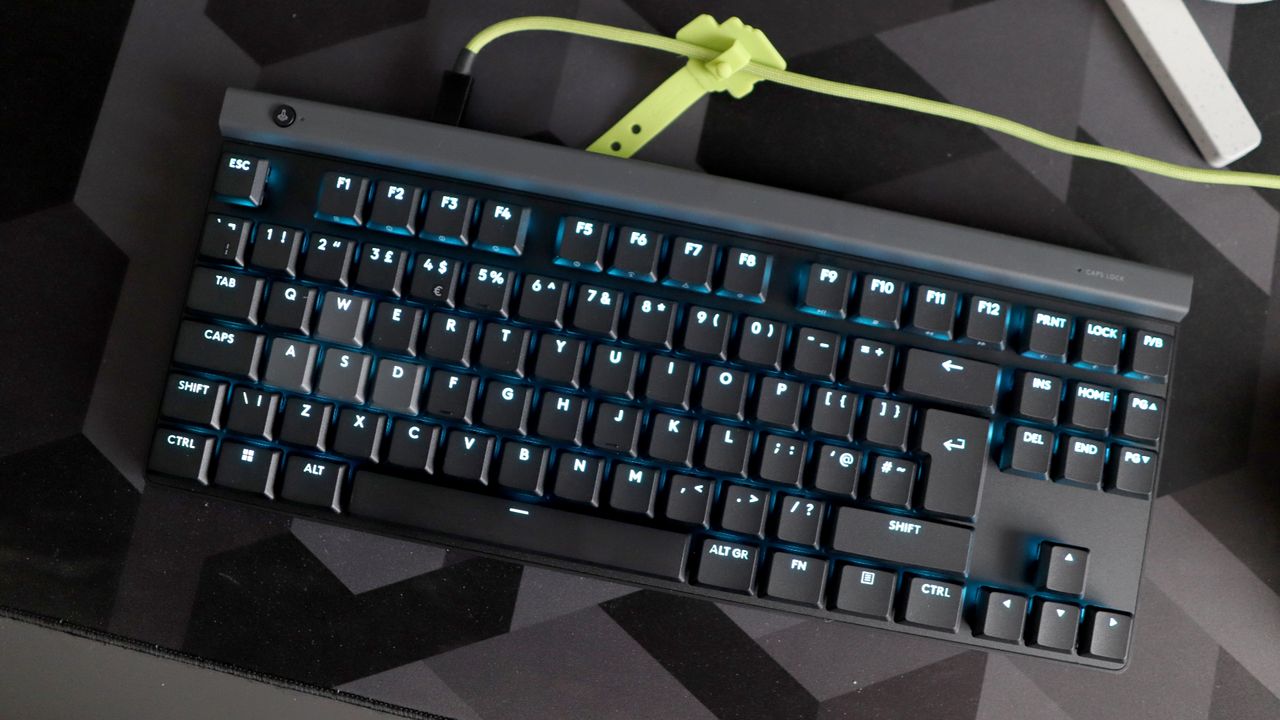
I’m planning to better balance the recent glut of high-endhardware reviews with some genuinely affordable stuff, but in the meantime, here’s something that’s a little of both. The Epomaker G84 HE is another Hall effect keyboard, meaning its magnetically operated switches can be adjusted for actuation height, and/or set up for strafey-strafey, shooty-shooty rapid trigger/Snap Tap shenanigans in compatible games. Both are features you’d normally expect to run pricing up into the triple figures, and yet at £80/$85, the G84 HE costs more like a lower-mid-range, traditionally mechanical 'board.
The CES show floor officially closes its doors at the end of the day, but there's still a trickle of announcements and reveals coming out of Las Vegas. If you're struggling to stay on top of all the new tech, gadgets, concepts, and AI-powered devices as the final day of CES gets underway, we're still rounding up the best hardware and upgrades that have debuted so far so you can quickly get up to speed.
And now for something..membranical? Mem-chanical? What on earth do we call these things? It's been aeons since I last looked at a membrane keyboard positing itself as a value-oriented gaming option – the Glorious GMBK is the latest one to enter through the revolving door of potential disappointment.
Okay, I'm starting things on a sombre note, and I apologise for that. Maybe it's because I've seen it all before, but a £50/$60 membrane keyboard touting itself as a value-driven gaming keyboard with all the flashy RGB you could ever want is one of the oldest tricks in the book.
Nonetheless, the Glorious GMBK is here, and I've been employed by hardware overlord Jacob to give you my thoughts and opinions, so here you go……
….It's alright.
Glorious GMBK 75% specs
(Image credit: Future)
Switch type: Rubber dome membrane Keycaps: ABS Lighting: RGB, controllable in software and on keyboard Onboard storage: None Extra ports: None Connection type: USB Type-C wired Cable: USB Type-C/USB Type-A, detachable Weight: 990 g/2.18 lbs Price: $60/£50
That'll do, won't it? .... No? Ah, I suppose I'll have to expand on why I think that.
On the face of it, what's here is standard fare for a more affordable gaming keyboard, membrane or not. A reasonable plastic chassis that's surprisingly light and has a little bit of flex, plus smooth ABS keycaps that will eventually shine more than that Take That song, plus they are quite slippery in use. PBT keycaps, by contrast, have more of a textured finish to aid comfort and grip, plus have the benefit of being more durable and shine-resistant. It is also IP57 water resistant, so if you douse it in water accidentally or on purpose, it'll hold up.
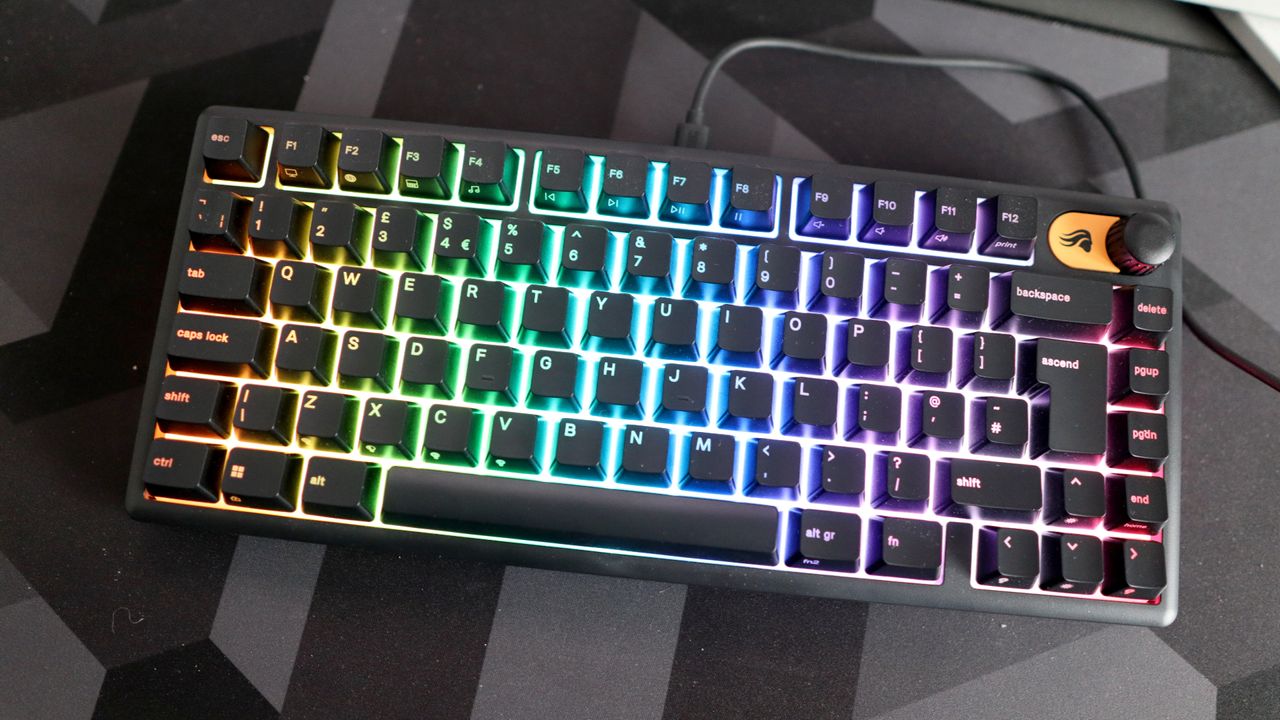
The 75 percent layout is a pleasant touch, and quite rare for this style of product, as is the knob in the top corner. Glorious told me the volume knob is swappable with those on their mechanical flagship GMMK 3, so if you want to give this humble membrane keyboard the premium treatment, then go right ahead.
Another way you could give this keyboard the premium treatment is by swapping those wretched keycaps out. I can already hear you shouting at me—"You can't swap the keycaps out on a membrane keyboard!" Well, with the GMBK, you can.
Glorious has given the actuators underneath the keycaps an MX-style cross stem, which they say means it's possible to swap out the keycaps to any MX-style keycap set you have. That earns them some brownie points for innovation and customisability at least, and is the real USP of this keyboard over its rivals.
Image 1 of 2
(Image credit: Future)
Image 2 of 2
(Image credit: Future)
I'm trying to beat around the bush as much as possible in terms of describing the feel of the rubber domes underneath the keycaps, but I should probably just come out and say it.
The GMBK's membrane keypress feels heavy and laboured. After a decade or so of consistently using mechanical and electro-capacitive switches as an enthusiast, going back to a membrane board in any guise just felt wrong. It took me back to using the dreadful keyboards that were bundled with the PCs in computer suites when I was at school, except this one was missing half its keycaps. If schools get their hands on these, they can at least replace them.
Where tactile mechanical switches have a pleasant bump and a smoother keypress, the domes inside the GMBK make for a stickier and much heavier set of inputs that can get quite fatiguing after a time. Granted, they are some of the better domes I've used against this keyboard's rivals, such as the Roccat Magma, which could feel like a wet newspaper after just a few minutes of use, but the fact is that they're still rubber domes.
Image 1 of 2
(Image credit: Future)
Image 2 of 2
(Image credit: Future)
Glorious is claiming these domes are quiet switches, which I unfortunately have to disagree with. We're at a stage where silent mechanical switches are whisper-quiet, while the noise from the electro-capacitives inside my HHKB and Topre RealForce R2 is barely noticeable. By contrast, the domes here are quite loud and almost clicky, although not in the satisfying way you'd expect. It's more of a rhythmical drone as you get up to speed.
As for gaming performance, well, they're domes. The heavier keypress means these aren't as fast or precise in feel as mechanical switches, let alone the Hall effect magnetic switches that have now come to keyboards as far down the price ladder as this.
The Gamakay x NaughShark NS68 provides Hall effect and rapid trigger powers in a small form factor layout with PBT keycaps and a high polling rate for a comparable price tag. If gaming oomph is what you're after and you're strapped for cash, then go look at my review of that.
Connectivity? Sure, it's got some—a wired USB Type-C to USB Type-A cable that is detachable from the keyboard, so you can at least discard it to one side. It's one of the cheapest cables I've felt in some time, with a sticky feel to it that isn't too pleasant to touch.
Image 1 of 2
(Image credit: Future)
Image 2 of 2
(Image credit: Future)
And there is some software! Glorious Core is back and is actually usable with the GMBK. It's got a decently slick interface that provides a means of remapping RGB, plus sorting keybinds and even recording macros. You can also fiddle with RGB presets using the keyboard's function layer and arrow keys to cycle through and sort brightness.
So, where does all this leave us? I've often thought that membranical or mem-chanical gaming keyboards occupy a funny position in the market. Cheap enough to be attractive to the budget-conscious gamer, but not as desirable as mechanical products.
The GMBK doesn't do too much to move that needle. I can see why the £50/$60 price tag is attractive if you want a cheap keyboard with RGB lighting, plus its swappable keycaps at least make it different to other membrane products out there.
Buy if:
✅ You want a customisable membrane board: The GMBK is unique in its offering for a somewhat customisable membrane keyboard, which is neat.
Don't buy if:
❌ You want a better typing feel: The rubber domes inside feel stiff and heavy, and a comparable mechanical keyboard quite simply won't.
However, at every corner I turn to, I just find more reasons to opt for a cheap mechanical keyboard such as the Keychron K2 V2. That board has a similar layout, swappable mechanical switches and wireless connectivity for a similar outlay.
Or, for more of a gaming focus, the aforementioned Gamakay x NaughShark NS68 provides more durable PBT keycaps plus all the power of rapid trigger-capable switches for much faster, lighter, and more precise inputs for high-intensity gaming. And it has RGB.
I somewhat appreciate what Glorious has tried to do with the GMBK 75%, but it isn't sitting right with me, I'm afraid. Sorry chaps.
I know that a lot of keyboards have little LCD screens these days that you can use to do things such as keep an eye on system metrics and such, but I like the one on the new Corsair Vanguard Pro 96 purely because I can display an image of the Bullseye logo on it.
Every time I look down at the keyboard, I'm reminded of the quintessential British darts-based game show, and inevitably get the theme tune stuck in my head. That alone makes this worth its £210/$240 asking price, of course.
For some reason, I think my overlord Jacob would expect a fuller justification than that (just let me enjoy my Bullseye-based fun), and I think I'm going to be reprimanded if I end the review copy here.
Okay, I guess I'll have to flesh this review out more—I like the Corsair Vanguard Pro 96. A lot. Is that still not enough?
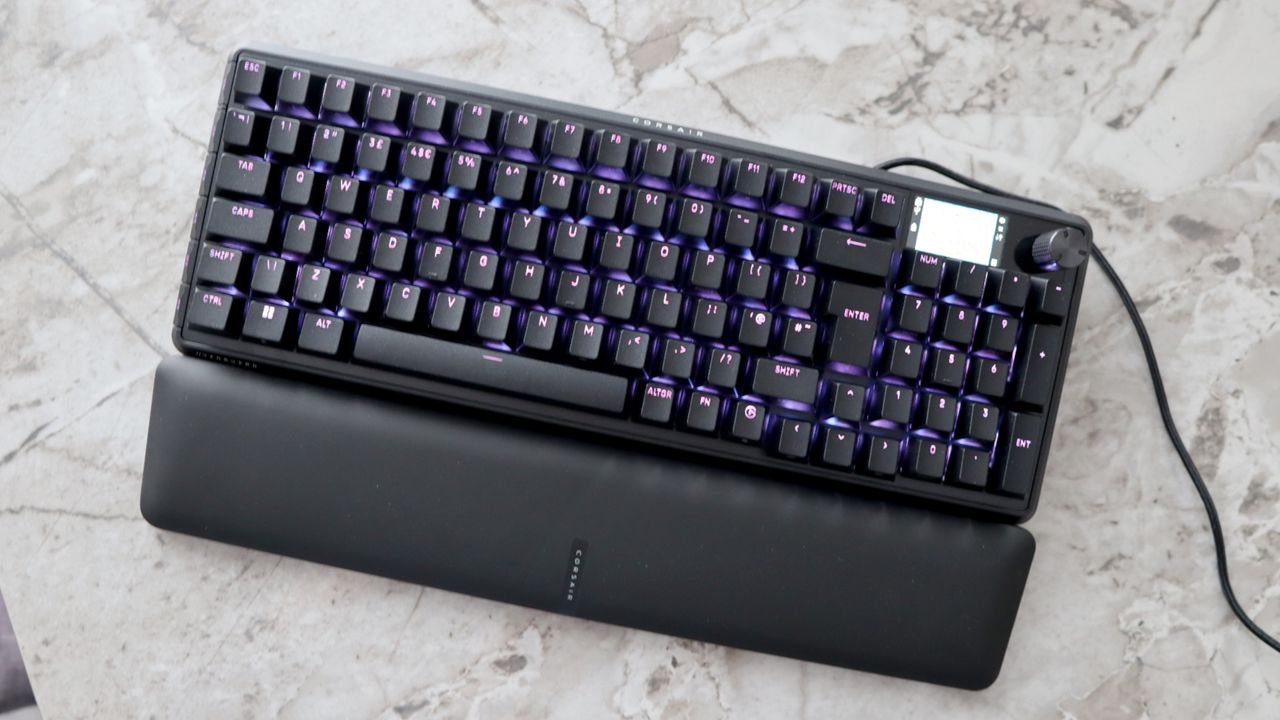
The Vanguard Pro 96 reminds me of the Corsair keyboards of old—big, brash full-size options that made little physical compromises for layout and, by virtue of that, their features. You get a 96 percent, or 1800, layout to use, providing all the creature comforts, such as arrow keys, a number pad and a function row, which budges up the traditional full-size layout into a somewhat space-saving option. Combine this with Corsair's more modern design language, and it means this board looks the part, too.
Somehow, Corsair has managed to slot in a 1.9-inch LCD screen, a hefty volume dial, and six macro keys in this chassis without making this keyboard the size of a whale. That's a feat in itself. It means the Vanguard Pro 96 is easily one of the most feature-rich keyboards in a physical sense that you're likely to be able to find these days.
Those macro keys, plus the dedicated Elgato Stream Deck key on the bottom row, mean you can use this keyboard as its own Stream Deck, which is very clever. Oh, and did I mention you get a magnetically attaching, plush wristrest?
Build quality is strong too, with a metal top plate and generally solid-feeling plastics. It's not as heavy as the fully machined options from Keychron and such, limiting its viability as a physical weapon, but it is heavy enough that it won't move around your desk if you look at it funny.
The LCD screen can do more than just display a Bullseye wallpaper, too. Using Fn+F12, you can cycle through settings that it can display in conjunction with the rotary dial to its right, such as volume control, macro recording, and even scrolling vertically or horizontally. It's one of the most versatile screen and dial combos I've seen on any keyboard in quite some time.
Image 1 of 3
(Image credit: Future)
Image 2 of 3
(Image credit: Future)
Image 3 of 3
(Image credit: Future)
Corsair has also ditched its woeful iCUE software for the Vanguard Pro 96, instead following the lead of Keychron and other smaller brands, opting for a web-based software that's slick, lightweight, and very easy to use.
Here you can program what the screen and rotary dial of the keyboard will do, plus do all the usual business with remapping keys, configuring RGBs and setting things such as actuation point and rapid trigger powers.
This keyboard is a Hall effect option, meaning we've got versatile and customisable magnetic switches—the ones inside this keyboard are Corsair's own MGX Hyperdrive switches.
These come with the versatile customisation I've come to expect, with both the actuation and reset point of the switch adjustable across virtually the entire travel, as high as 0.1 mm and as low as 4 mm.
Image 1 of 2
(Image credit: Future)
Image 2 of 2
(Image credit: Future)
Being rapid trigger, the MGX Hyperdrive switches have the benefit of adjustable actuation and reset point for near-instant response times. You can set both the actuation and reset point as high as possible—as high as 0.1 mm with this keyboard—to mean that you barely need to breathe on the switch for it to register an input. At that point, Corsair says they have a super light 30 g actuation force, while setting it all the way down at 4 mm means a 55 g force.
There is also the usual SOCD-type tech we've seen in rival boards from Wooting, Keychron and others, with different priority modes for all your unnaturally quick strafing action. I maintain that brands put it into the keyboard to add to the spec sheet, as the feature is about as useful as a chocolate fireguard in competitive online play, as it could allow folks to wield the ban hammer against you, as Valve has done with Counter-Strike 2.
Technically, the MGX Hyperdrive switches are hot-swappable, and Corsair bundles a handy switch and keycap puller in the box. However, it is unclear as to what switches you could replace them with, as they lack the usual 3 or 5 pinouts of standard MX switches, and the compatibility for Hall effect hot-swappable keyboards can be quite hard to pin down anyway.
Image 1 of 2
(Image credit: Future)
Image 2 of 2
(Image credit: Future)
During several gos at Counter-Strike 2 (more than I care to admit, pwning low-level bots can be quite addictive), I found the Vanguard Pro 96's switches to be especially brisk and consistent in their feel. They're a smooth and snappy pre-lubricated switch that helps to make the keyboard one of the fastest you'll find in its class, plus if you want it, there is an 8000 Hz polling rate—not that most mere mortals will be able to tell the difference.
Connectivity for this keyboard is fully wired, meaning you never have to worry about pairing it over Bluetooth or 2.4 GHz, and there's no need to worry about charging it up. The braided USB Type-C to USB Type-A cable that comes with it is a decent quality, and the Vanguard Pro 96 has lots of cable channelling on its underside, so you can decide where to route the cable with no trouble.
Buy if…
✅ You want a powerful full-size keyboard: The Vanguard Pro 96 is a potent keyboard with few compromises on size, speed, and physical features.
Don't buy if…
❌ You want wireless connectivity: Given the higher price tag, some folks may prefer a more versatile wireless option against the strictly wired connectivity Corsair has provided.
I do have a small bone to pick with Corsair, though, on the cable routing. The USB Type-C port for connecting the keyboard in the first place is so far sunk into the chassis that it can be a bit of a pain to access at first. It surely would have been easier to put the port directly on the rear edge of the chassis, rather than sinking it several inches deep.
To sum up, I like the Corsair Vanguard Pro 96, and it's for more than just some childish fun with an LCD screen. This is genuinely one of the best Hall effect keyboards out there if you want a full-size layout with lots of nice touches, plus some versatile software and responsive switches. At £210/$240, it will come at a considerable cost against its rivals, though.
The MSI Forge GK600 is a tenkeyless (TKL) gaming keyboard, meaning it's missing the numberpad. But Katie, I hear you say, if a normal keyboard has all the keys you could ever want, what's the point getting rid of them in favour of a TKL board? Well, friend, it's all about real estate and maneuverability. And cash, of course. But isn't everything? Say you've spent all your cash on the best gaming PC and you're now stuck with a teeny tiny desk. A TKL board nets you more desk space so you can stack plates and coffee cups beside it to your heart's content, or whatever else you're draping over your battlestation.
With the MSI Forge GK600, you're killing two birds with one stone: saving space on your desk while also protecting your dragon's hoard of gold. Let's get into what makes the Forge GK600 special and, of course, what doesn't.
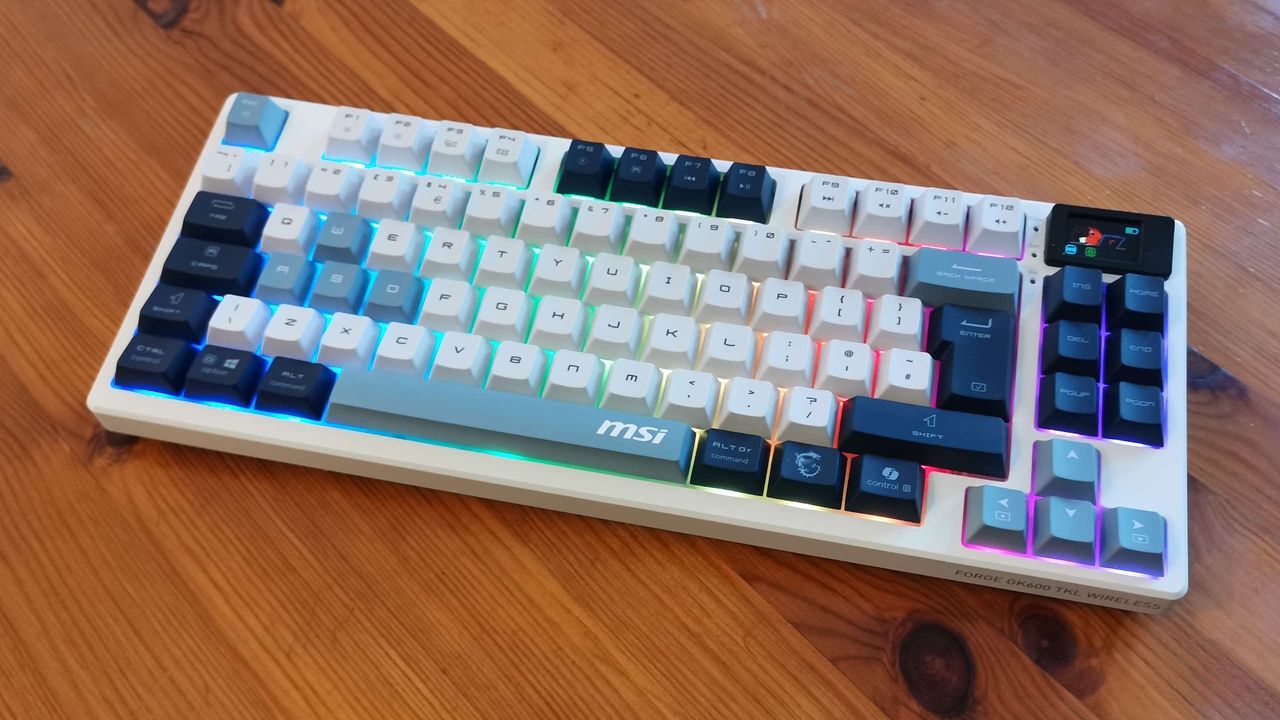
Sitting somewhere in the region of a 75-80% layout, the Forge GK600 takes up less space without sacrificing as much productivity as the super compact layout of something like the 60% NuPhy Air60 HE. Its dedicated navigation and direction keys aren't being swallowed up by the mass of other keys, so you don't need to fumble around for them, while the two-column layout of the navigation section keeps it from extending into your valuable mousepad space. There's no programmable macro keys, but you still get use of 12 F-keys at the top.
I'm not a huge fan of the Delete key being dead center of the left column as a person who spends most of their time re-hashing walls of text. It initially left many a paragraph lost to an erroneous page-up/insert keystroke, but didn't take long to get used to the odd positioning.
MSI Forge GK600 TKL wireless specs
(Image credit: Future)
Size: Tenkeyless Switches: Mechanical linear, hot-swappable (5 pin) Key caps: Dye-sublimated PBT Backlighting: Per key Anti-ghosting: N-key rollover Polling rate: 1,000 Hz Dimensions: 32 x 13.5 x 3.5 mm Weight: 943 g | 33.2 oz Connections: 2.4 GHz | USB Type-C | Bluetooth Cable: 180 mm Battery life: 26 hours with lighting Features: 1.06-inch LCD display Warranty: 2 years Price: £74/$90
In place of dedicated media controls, like the lovely programmable dial of the Corsair K65 Plus, MSI has opted for a funky little display in the top right corner. I thought it was just a flashy solution for indicator LEDs so you know what you're connected to, whether that's via Bluetooth, wireless, or a wired connection, and if you're about to type in caps or have accidentally locked your Win key.
The display had felt completely unnecessary until I realised it has a full menu of lighting profiles and other goodies in there. There are loads of great lighting effects to scroll through. While that makes the screen slightly more useful, and omits the need for software, I'd personally rather it not waste what little battery life there is. Especially as that's the major drawback of the whole package for me.
I got an RGB-lit battery life of just 24 hours out of the Forge GK600—around three days of gaming and working, on and off. That's not the worst battery life I've seen on a gaming keyboard, but it's a darn sight shorter than something like the Keychron K2 HE's 74 hours with RGB enabled. Switch off the lights, and MSI reckons you'll get 20 days out of it. Assuming you're at your keyboard 8 hours a day that's around 160 hours, which is still less than half the 240 hours unlit that the Keychron offers. Then again, the prices do scale accordingly.
Image 1 of 3
(Image credit: Future)
Image 2 of 3
(Image credit: Future)
Image 3 of 3
(Image credit: Future)
Sadly, MSI opted for opaque legends on the Forge GK600 keycaps, which means the board is all but useless in the dark. Everything else about the keys is fantastic, however, from the cute, tri-tone colourway, to the OEM profile that gently cradles my fingers, to the subtle non-slip keycap texture. The fact everything is hot swappable is just the cherry on the cake, or on the keyboard if that's what you want. Should MSI's proprietary linear mechanical switches not suit your preferences—and they won't be for everyone—it's easy to swap them out for third-party switches of your choice.
For a lot of people hot-swap switches will be the main draw, but since the Forge GK600 positions itself close enough to the budget range, it could happily appeal to users who aren't into keyboard modding. That said, the lack of alternative switch options for the base board is more likely to alienate any non-modders hankering for a clicky experience, or something a little more tactile.
Tapping away at the board, the linears are swift and offer some intense resistance, though they can feel a little gooey with the level of bounceback. It's clear some effort has gone into sound dampening. With an IXPE foam layer, silicone pad and various extra layers added to try to keep the noise down it does a good job of softening the clunk. Sadly, all that padding affects the board exponentially when it comes to weight and thickness.
Image 1 of 6
(Image credit: Future)
Image 2 of 6
(Image credit: Future)
Image 3 of 6
(Image credit: Future)
Image 4 of 6
(Image credit: Future)
Image 5 of 6
(Image credit: Future)
Image 6 of 6
(Image credit: Future)
Buy if...
✅ You're in need of distinct directional keys: As a TKL board, the D-keys aren't as bunched up as smaller, compact boards. It means you can easily find them without looking down.
✅ You're looking to make the most of hot-swap: Non-enthusiast keyboards with hot swappable keyswitches usually come in at a premium price for the privilege, but not here. Make the most of the money saved and nab yourself some interesting switches to play around with.
Don't buy if...
❌ You switch up devices and connections a lot: MSI could have made it a lot easier to switch between wired/wireless or just turn the thing off. A switch on the underside means it's a juggling act whenever you need to access it.
❌ You use your keyboard in the dark: Opaque legends on a gaming keyboard mean it's not entirely practical for use in the dark, which negates the need for RGB altogether really, other than as another way to waste the battery.
At the thickest point the Forge GK600 is 34 mm, and I wouldn't exactly call it a lightweight board either at 943 g. 56 g shy of a full kilo makes it a hard to champion as a portable keyboard. Sure you're saving a little more desk space and neatening up your battlestation with the omission of wires, but portability is something all wireless boards should be aiming to offer in the age of gaming on the go. The weight will also play into a decision for anyone who switches up connections a lot.
While it's possible to connect either it with the USB type-C cable, 2.4 GHz wireless via an appropriately compact dongle, or to up to three machines simultaneously via Bluetooth, the Forge GK600 hides the switch directly under the keyboard. It's dead center, with the labelling upside down if you lift the keyboard vertically. It's not even close to accessible, so if you switch connections a lot this probably isn't the board for you.
When all is said and done, the Forge GK600 TKL is a relatively good price for what you're getting. It's part of the budget Forge line that frankly has no business being as snazzy as it is. And so much for the pink tax, because the violet Forge GK600 TKL actually comes in cheaper.
At this price, it all depends on what you can afford to overlook as to whether this board is for you. If you're not worried about moving around and key spacing doesn't bother you, the Gamakay x NaughShark NS68 offers Hall Effect switches with programmable actuation for half the price of the GK600 TKL. Otherwise, the budget Forge GK600 TKL still offers a lot for stationary gamers who play mostly in rooms with the light turned on. We goblin-moders might look elsewhere, though.
As the old saying goes, you can't have your cake and eat it, too. And that's a shame, because I was quite looking forward to this Logitech-flavoured one.
Not too long ago, Logitech revised its longstanding low-profile keyboard lineup with a new G915 X Lightspeed model and the cheaper G515 Lightspeed TKL option, both of which I've looked at in the past. Both of those keyboards were in the Swiss brand's more traditional wheelhouse, opting for a conventional low-profile switch, plus creature comforts such as solid build quality and fast wireless connectivity.
The all-new G515 Rapid TKL isn't in that wheelhouse, though. Its switches are no longer standard low-profile mechanical ones, and instead are low-profile magnetic analogue ones. That means all the fun of rapid trigger and its clever software trickery into an already short and snappy travel.
I'll get to those switches in a minute. As I mentioned a minute ago, this keyboard is an example of the Logitech-flavoured cake being given to you but not consumed, in that it sacrifices any form of wireless connectivity. Say goodbye to Lightspeed, chaps, as it isn't here, which is a real shame. At least it works plug-and-play, I suppose.
Logitech G515 Rapid TKL specs
(Image credit: Future)
Switch type: Logitech magnetic analogue Keycaps: PBT, doubleshot Lighting: RGB, controllable in software Onboard storage: None Extra ports: None Connection type: Wired-only Cable: USB Type-C/USB Type-A, detachable Weight: 0.8 kg/1.76 lbs Price: $170/£140
Nonetheless, the switches are the important change, which gives the G515 Rapid TKL its 'rapid' moniker. Being magnetic switches means they're very similar to more full-size iterations seen in many of the best Hall effect keyboards, although the added benefit of the ones here is that they have a shorter travel all the time, being low-profile and all.
The general point is that these switches are much more configurable than the more standard low-profile mechanical switches you'll find in Logitech's other low-profile keyboards, having customisable actuation and reset points. This means you can choose how far down the switch's travel it registers an input and resets, giving you much faster keypresses than classical switches with fixed points for both.
With these switches, you can customise actuation and reset points in 0.1 mm intervals in Logitech's G Hub software. Doing so is remarkably easy, and within a few clicks, I'd applied it to movement, weapon selection and the crouch keys in Counter-Strike 2 for ultimate speed. As much as you feel the speed benefit of low-profile switches against full-size ones in a more general sense, the move to rapid trigger-capable ones yields a greater benefit in competitive shooters, for instance.
In my varying rounds of Counter-Strike 2, I was impressed with the responsiveness of the G515 Rapid TKL's switches due to those adjustable actuation points. Indeed, the fact that the switches are linear and have a very smooth keypress helps with that responsiveness.
I wasn't so mad keen on using this keyboard for general productivity and work stuff, though. For whatever reason, the switches in the G515 Rapid TKL fall into the old trap of magnetic switches feeling quite hollow. I never found myself feeling particularly comfortable using them for an extended period in the last couple of weeks, choosing to switch back to more familiar territory.
(Image credit: Future)
Of course, as well as the powers of adjustable actuation points and rapid trigger, this Logitech keyboard is endowed with the software trickery we've come to expect from a gaming keyboard in 2025. These include generally useful stuff such as dynamic keystroke, where as you go down the switch's travel, it can map several inputs—for instance, you could start by walking, and then as you continue further down the travel, you could crouch, or run.
Plus, you get the SOCD tech (Simultaneous Opposing Cardinal Directions or Snap Tap, as Razer likes to call it) tech for unnaturally quick side-to-side movement that'll get you banned in online CS:2—when opening up the menu for its configuration in Logitech's software, it plainly states you risk getting banned.
Otherwise, Logitech's G Hub provides the usual fare of configuring the keyboard's RGB lighting and remapping keys. The key remapping is particularly powerful, given the presence of the magnetic switches, as you can even add modifier keys to either a first or second keypress on any given key. That comes in conjunction with a base, function, and the G-Shift layer, meaning you can almost have ten different inputs per key if you wanted to.
(Image credit: Future)
Where the G515 Rapid TKL hasn't changed from its Lightspeed brother is the actual fit and finish, which is not really a bad thing. I liked how this keyboard felt in its first version, with a sensible and space-saving TKL layout that isn't too jarring if it's your first SFF keyboard, as you only miss out on the number pad. Other keys haven't been moved around or changed, as with smaller layouts that'll take some getting used to—I'm looking at you, beloved HHKB.
The entire chassis here is plastic, meaning it lacks the premium fit and finish of rivals such as the smaller NuPhy Air60 HE, although there isn't any flex to the chassis. When taking it out of the box for the first time, I noticed a surprising amount of heft to the G515 Rapid TKL, which was a welcome surprise. The keycaps here are textured PBT, providing an extra dose of quality.
Its two-tone colour scheme is quite pleasant, with my sample shipping in black. This Logitech keyboard is predominantly black, although there are silver accents across the top and on the WASD keys. This used to be quite common for gaming keyboards, and seemed to fall out of favour some time ago, so it's pleasant to see it make a return.
(Image credit: Future)
I realise I've gotten through this entire review and not even mentioned the price of the G515 Rapid TKL. I'll give you a couple of minutes to guess before revealing….okay, had enough? It's $170/£140. For a wired-only low-profile gaming keyboard, even one with rapid trigger powers, that feels quite expensive for the plastic package on offer.
For reference, while the NuPhy Air60 HE trades some keys for a smaller layout, I think it looks nicer with its purple and silver colour scheme; it has even more powerful rapid trigger switches, plus the benefit of an 8000 Hz polling rate for even more frequent reporting (ideal for pro players) and it's between $30 and $50 cheaper than Logitech's option.
Buy if...
✅ You want a potent low-profile gaming keyboard: The G515 Rapid TKL impresses with fast and responsive keypress through its combo of low-profile magnetic switches.
Don't buy if...
❌ You want wireless connectivity: It's a shame Logitech cut wireless connectivity from this keyboard against its predecessor, especially with its higher markup.
At this price, we've also got to consider the likes of the Wooting 80HE, which gives you full-size switches rather than low profile, a cooler aesthetic, and the powers of progressive, controller-like inputs, as well as all the stuff Logitech is offering here. That's in and around the same price tag, and is a bit more feature-rich.
Likewise, the beloved Keychron K2 HE sits at $140 or so, so it is cheaper than Logitech's choice. It brings in full-height magnetic switches for rapid trigger functionality, plus a smart aluminium or wooden case, and most importantly, it can connect wirelessly. So, it is possible to have your cake and eat it—just look at Keychron.
Oh, and I didn't even mention the ridiculous value Gamakay x NaughShark NS68, whose $50 price point with rapid trigger and 8000 Hz powers, plus PBT keycaps and a small form factor layout, speaks for itself.
The Logitech G5215 Rapid TKL sits in a little bit of an awkward place, then. This is a good, rapid trigger gaming keyboard, and I like how convenient its software is and how fast it feels, but a plastic chassis and solely wired connectivity do leave a little bit of a sour taste.
Cherry has announced Black Friday promotional pricing across several popular mechanical keyboards, available now through Currys and Amazon UK whilst stocks last. Gamers, creators, and home workers can access substantial discounts on models including the K5V2 at £39.99, K4V2 at £29.99, and the IP54-rated K33 White at £39.99.
K5V2 at Exceptional Value
The Cherry K5V2, now available for £39.99 in black or white variants, represents remarkable value at this promotional pricing. Having previously reviewed this keyboard, the build quality and switch engineering impressed throughout extended testing periods. At this reduced price point, the K5V2 becomes accessible for budget-conscious buyers who might otherwise overlook premium mechanical keyboards.
The combination of Cherry’s established reputation with aggressive Black Friday pricing creates compelling upgrade opportunities for anyone currently using membrane keyboards or ageing mechanical alternatives.
MX2A Switch Technology
Select keyboards in the promotion feature Cherry’s latest MX2A mechanical switches, delivering smoother keystrokes, improved acoustics, and exceptional durability rated for over 100 million presses. This longevity ensures years of reliable performance, justifying investment even at full retail pricing.
The acoustic improvements address common mechanical keyboard concerns regarding noise levels, whilst keystroke refinement benefits both gaming precision and extended typing sessions. These switches represent Cherry’s continued engineering evolution rather than simple rebranding of existing components.
Model Range and Pricing
The K4V2 at £29.99 provides entry-level mechanical keyboard pricing rarely seen from established manufacturers. Both black and white colour options accommodate different aesthetic preferences and desk setups.
The K33 White offers IP54 dust and water resistance alongside Windows and Mac compatibility at £39.99, targeting users requiring environmental protection without sacrificing typing quality. This spill-resistant design suits kitchen workstations, workshop environments, or households with accident-prone beverage consumption habits.
Availability Considerations
Key Account Manager Del Fadipe emphasises the opportunity: “Consumers want gear they can rely on, and this is a great chance to make the switch. Our keyboards are built for comfort and precision, and these Black Friday prices make them even more accessible.”
The “while stocks last” limitation suggests genuine promotional inventory rather than permanent price reductions. Interested buyers should act promptly rather than assuming availability throughout the Black Friday period.
Both Currys and Amazon UK stock these deals, providing purchasing flexibility through different retail channels with varying delivery options and customer service approaches.
For anyone considering mechanical keyboard upgrades, Cherry’s Black Friday pricing removes typical cost barriers whilst maintaining the build quality and switch engineering that defines their product reputation.