Normální zobrazení

Received today — 6. Červen 2026 English

A Parent’s Guide to Pokémon Pokopia

Pokémon Pokopia At a Glance

  • Pokémon Pokopia is rated E (Everyone) with Interactive Elements for Users Interact and In-Game Purchases.
  • Pokémon Pokopia on the Nintendo Switch 2 console for $69.99.
  • Pokémon Pokopia is a “life simulation” game set in the Pokémon universe where players will explore their surroundings, harvest materials, and (most importantly) befriend Pokémon to unravel mysteries.

As ESRB’s resident Pokémon Master, I’m ready for Pokémon Pokopia. This Pokémon spinoff (distinct from the many others like pinball, turn-based tactics games, dungeon crawlers, and more) brings the series into the simulation genre. Rather than stepping into the shoes of a Pokémon trainer, players will instead embody a Ditto on a mission to attract wild Pokémon back to a deserted region.

While still Pokémon, Pokopia plays nothing like the core games. Read on for more information to help you decide if Pokémon Pokopia is appropriate for your family.

Is Pokémon Pokopia Appropriate for Kids?

Pokémon Pokopia is rated E for Everyone, with no Content Descriptors. However, there are Interactive Elements assigned, including Users Interact (meaning players can communicate through the game) and In-Game Purchases (meaning users can use real money to purchase virtual currency that can be used to purchase in-game content).

According to ESRB’s Rating Summary Pokémon Pokopia “is a simulation game in which players assume the role of a Pokémon that works to transform a desolate world into a thriving habitat. As players interact with characters, they can collect resources, fulfill requests, and build various landscapes.”

Keep in mind that ESRB ratings are intended to help you decide if a game is appropriate for your kids from a content perspective. In other words, Pokémon Pokopia is likely appropriate for your family given its E for Everyone rating, but some younger players may struggle to manage some of the more complex gameplay systems by themselves. Having said that, if you decide that Pokémon Pokopia is appropriate for your kids, it’s a great opportunity to play together regardless of age!

Where Can I Play Pokémon Pokopia and How Much Does It Cost?

Pokémon Pokopia is available for the Nintendo Switch 2 and retails for $69.99 physically and digitally. As mentioned, the ESRB rating also includes the Interactive Element for In-Game Purchases. This means that there may be additional options to spend real-world currency on in game content (items, DLC, etc.).

Make sure you check that you’ve set parental controls to manage spending on the console!

What is Pokémon Pokopia About?

In Pokémon Pokopia, the player awakens in the gooey pseudopods of a Ditto, a Pokémon with the ability to transform into any other Pokémon. This Ditto, however, has apparently been napping for a long, long, long time. Its trainer is nowhere to be seen, and its surroundings are unrecognizable.

The game begins with Ditto transforming into its best approximation of its trainer to ask around if anyone has seen them. This also acts as a sort of character customization for the player – allowing you and your kids to pick hair, clothes, and other visual elements of Ditto’s trainer.

If you’re familiar with Ditto, you may know that its transformations are… not always exact. For example, here’s my Ditto, which I created to approximate yours truly (it’s flawless!):

A ditto impersonating a human in Pokemon Pokopia.

Ditto soon discovers that the they have woken up in a dilapidated Kanto region (the explorable continent from the original Pokémon games). It is completely devoid of all life… save for one Pokémon: Professor Tangrowth. The Professor informs Ditto that the humans are long gone (though they don’t know why) and the Pokémon that once packed the region’s tall grass and caves have gone into hiding.

Luckily, Professor Tangrowth has some thoughts on Ditto can attract other Pokémon to the region and hopefully unravel the mystery of what exactly happened!

How Does Pokémon Pokopia Play?

In Pokémon Pokopia, you and your family will explore, harvest resources from your surroundings, create habitats for Pokémon, and build structures. In this “life simulation” game, your major goal is to attract as many new Pokémon as possible, keep them happy, and level up the environment to expand your array of craftable structures, items, decorations, and more.

All of these mechanics build on each other to allow you and your family with (quite literally) hundreds of options to customize each environment throughout the game.

The general loop will go like this:

Discover Clues to New Habitats

Ditto will find clues around the environment or via the in-game Pokédex that outline habitats that will attract new Pokémon. This can be something like cultivating patches of tall grass in a certain way, crafting/placing items or in a specified pattern, building structures near bodies of water, and more. Some habitats can be significantly more complicated than others but may attract rare Pokémon with valuable skills.

The player has organized four patches of wildflowers to create a habitat and attract Eevee in Pokémon Pokopia.

Meet a New Pokémon

If you nail the habitat requirements, you’ll attract a new Pokémon resident to the area! Hooray! Some of your Pokémon residents will teach Ditto a new move, while others may will open up new avenues to interact with and mold the environment. For example, your Ditto will  learn Water Gun from a Squirtle to water plants and hydrate soil. Meanwhile, you’ll need a Timburr (or another Pokémon with a “build” skill) to build houses and other structures.

Some Pokémon will even teach Ditto an entirely new transformation.

Use What You’ve Learned

Moves, skills, and transformations offer new ways for Ditto to traverse and manipulate the environment. Eventually, you and your family will use these skills and moves in concert to build homes, infrastructure, and more. Eventually, all these systems intersect and layer, allowing you and your family to think outside of the box and use your collective imagination to mold the region as you see fit.

Be a Good Friend and Level Up Your Environment

The Pokémon that move into your region also have “requests.” Pokémon will ask Ditto to help them out with something, be it a new piece of furniture for their habitat, or an entirely new habitat altogether! My Charmander buddy asked for a literal new house. In this market, Charmander?!

Anywho… Satisfying the request will increase the Pokémon’s comfort, and in turn raise the Environment Level.

As the Environment Level of the area increases Ditto and your family will unlock new customization options, recipes, items, and more. Which can all be purchased in the in-game shop.

The in-game store in Pokémon Pokopia. There are squares containing options to purchase in-game items like a bench, a mirror, and more using in-game currency.

For the record, this shop uses in-game currency earned from challenges (collecting a number of a specific resource, finding a number of unique Pokémon, etc.). During my play time I did not see any option to make a purchase with real world currency.

Single Player and Multiplayer

Pokémon Pokopia can be played both in single player and multiplayer. Up to four players can collaborate on an island at one time, so if you have the number of devices to support that, it could be a fun, age-appropriate experience for an entire family. Otherwise, you and your kids can join a shared, online territory with friends and family members. This is a more open-ended experience, with no real objectives other than whatever your kids’ imagination dreams up.

It also takes advantage of Nintendo’s GameShare, which allows one player to share a game with friends and family without needing more than one copy of a game. If you live in a house with multiple Nintendo Switch consoles, you and your family can all play together wirelessly. To be clear, a Nintendo Switch 2 is needed to “host” the game, but with GameShare it can be streamed to a Nintendo Switch console as well.

Despite the inclusion of both local and online multiplayer, your kids cannot communicate with others directly when playing the game online. Even so, I always recommend activating parental controls around communication as a backup. And remember… discuss with your children how to safely use platforms like Discord if they plan to chat with their friends off platform.

Making Sure Your Kids’ Video Game Expeditions are Safe and Appropriate

I always like to say that checking the ESRB rating before buying or downloading a game is a perfect first step. While many parents may get exactly what they need from a rating to decide, some parents may want more information. If you’re still on the fence, there are likely dozens of previews, reviews, trailers, and gameplay videos available for most titles that can give you a more in-depth look at the moment-to-moment gameplay. Some games even have demos that you can try out yourself!

When it comes down to it, there’s no better way to keep an eye on your kids’ games than staying involved! ESRB’s Family Gaming Guide has tips to help you start and maintain an ongoing conversation about what your kids are playing and why they love it. Keeping it judgement-free will also help your kids understand that you’re on their side, and they can come to you if they ever have any questions or concerns about something they’ve experienced while playing… be it alone or online with others.

From there, you can also establish some commonsense household rules around video games to outline things like spending and play time limits. To back up those rules, virtually every video game device also has parental controls to help you manage what your kids play, when and for how long, with whom, and whether they can spend money on in-game purchases or new games. Visit ParentalTools.org for step-by-step parental controls guides.

The post A Parent’s Guide to Pokémon Pokopia appeared first on ESRB Ratings.
Haven is a Perfectly Sweet Summer Love Affair

26. Květen 2026 v 17:00
Haven is a Perfectly Sweet Summer Love Affair

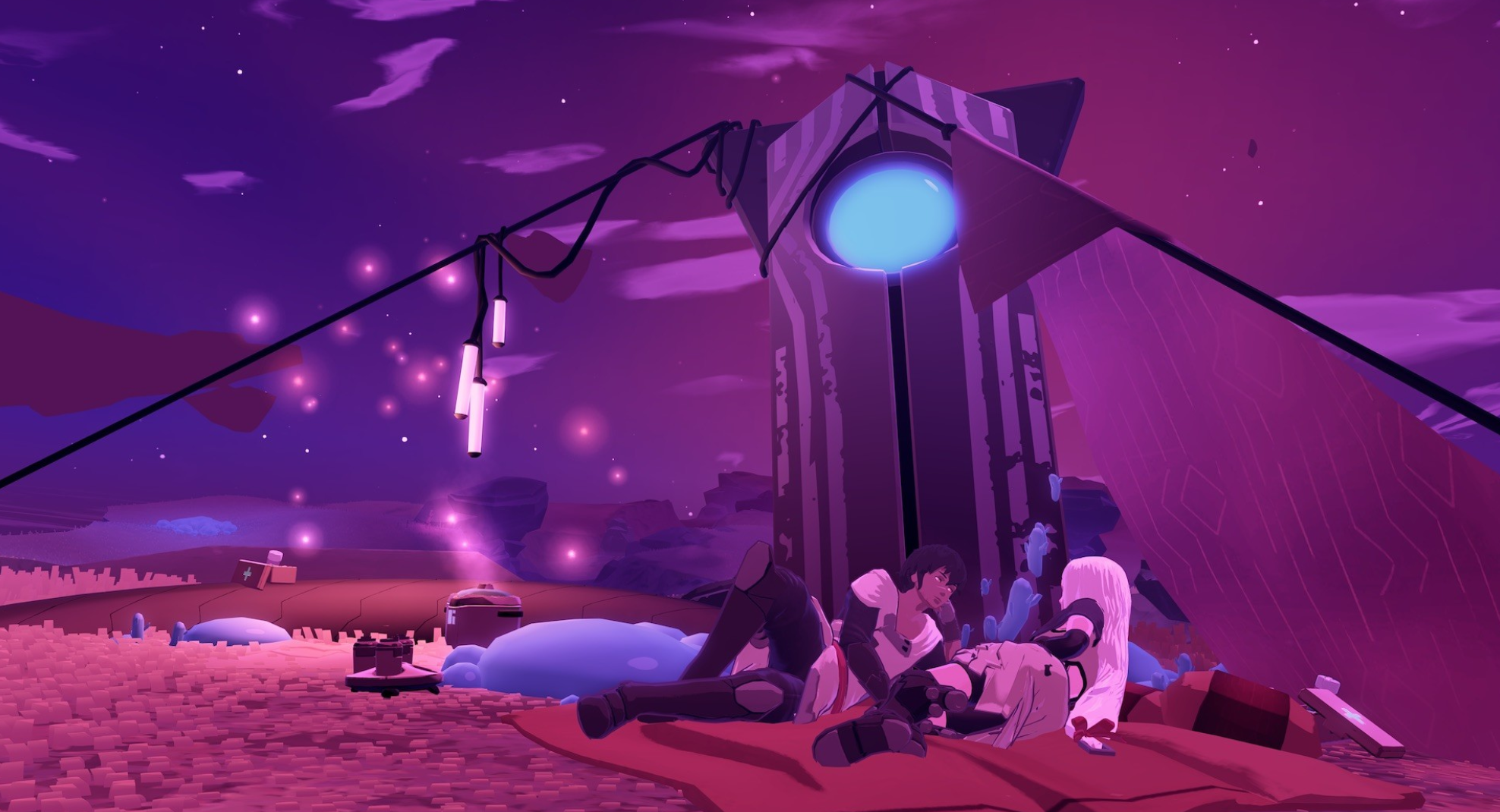
There's nothing quite like cruising through summer to upbeat techno. I have myriad fond memories of warm days to the tunes of Porter Robinson and Madeon, running along palm-lined boulevards. Haven brings me back there. I picked it up recently, following a sun-drunk day at the Renn faire, after it spent years in my TBP pile. Haven features these upbeat electronic soundscapes (from artist Danger) and pairs them with an exceptionally dream-colored world. Front and center, of course, is a love story. Or, rather, the continuation of one.

At its core, Haven is a relationship-sim. It isn't a romance game in the traditional sense, as you aren't responsible for romancing anyone from the ground up. Rather, you play as Yu and Kay, two already-lovers inhabiting a mysterious cluster of islands known as the Source after escaping their predestined lives under the authoritative space empire known as the Apiary. This dual POV means that you control dialogue options as either character, so you oversee their entire relationship. This more omnipresent overview allows you to witness the couple's collective post-honeymoon stages and all the struggles that ensue.

Outside of this, the rest of the gameplay involves open exploration, where you glide seamlessly over a cerulean-grassed landscape of broken-up islets, gathering materials to repair your ship, which also serves as the couple's crash-pad basecamp, affectionately known as the Nest. A mysterious "rust" plagues the islets and their creatures, though, so there's a good portion of discovery spent purifying these areas. It scratches a little bit of that sweet, sweet powerwash simulator itch, since you have to collect 'blooms' of rust to fully clear it out, and you can satisfyingly sweep around all of its red-pulsing patches as you see fit. Since the islets' little creatures grow hostile when infected with rust, this is also where you find the bulk of the game's fight mechanics, and its 'bosses' are usually bigger creatures you have to defeat to finalize the purification. Once the rust is gone, the islets can serve as launching points for further exploration and as places to resource-gather and camp.

All of these elements combine to paint a lovely picture – but, really, the core of Haven is the relationship between its heroes. It is, perhaps more so than many other romance-genre games, focused on the post-happily-ever-after dynamics: the pillow talk, the little in-between moments, the arguments, both awkward and real, that make a relationship worthwhile and cosmically beautiful.

Alone at Last

Upon release, Haven introduced its two leads – Yu and Kay – as a (respectively) female and male pairing. In a later update, they added two additional variations, so that you could play as a female Kay (paired with a still-female Yu) or male Yu (paired with a still-male Kay). This added a wonderfully inclusive element to an already lovely game, and the core component of being two young lovers navigating a life away from all they've known remains the primary throughline for all of them.

Haven is a Perfectly Sweet Summer Love Affair
Source: Steam.

Their choice to flee the Apiary is due largely to its societal regulation of relationships (as well as implied authoritative measures), in which the domineering Matchmaker essentially assigns you a genetic partner. But Kay and Yu are not a matched pair, so they must flee together, lest they be separated by the Apiary's draconian control.

Haven dives a little into the darker implications of this system on a wider political scale, but it isn't a political game, and you really spend the bulk of your conversations exploring love and the prospects of planetary homesteading. Eventually, you must contend with the ramifications of your escape, but often these discussions of government and morality serve more to outline characters' feelings and showcase opinions and experiences. Yu and Kay aren't trying to change the world; they're trying to live well in it.

They have their setbacks and triumphs while on the Source, but they navigate this new life with a decent centering of 'safety.' The game itself never diverges into oppressively dark, melancholic, or pessimistic territory. It is smartly light-hearted, which seems purposeful, so as a player, you can happily float in the 'cozy' space with this game and never worry about it throwing you through a depressing loop (there is, though, a technically 'bad' ending).

This behind-the-curtain glimpse at intimacy can border on a little voyeuristic at times, only in the sense that the game doesn't shy away from the finer details of all aspects of a relationship, and our protagonists are extremely (this is a very good thing) sex-positive. Look, straight up – it made me feel immensely single, even if I liked it enough to not let the glimpses through the door remind me that I was, perennially, alone. Now, though, my approach is from a vastly different headspace. Obviously, this is anecdotal – but the game is fundamentally about a relationship, so some of your enjoyment may correlate to how much you can stomach PDA and overt flirtiness. Are you a nose-scrunching-in-disgust kind of person, or do you tilt your head and let out a long 'aweeee?'

The game mentions sex and insinuates about it fairly often, and Kay and Yu are clearly, intoxicatingly in love. They flirt all the time and slyly wriggle their eyebrows at each other (suggestively, of course) many times throughout. This isn't played with in the usual romance genre fashion, in that most of those narratives tend to stretch that delicious tension of dramatic buildup until it ultimately culminates in a, you know, 'big' scene. Because these characters are established as being in love, the sex feels organic in a way that's refreshingly realistic and empty of exploitation. It's never shown (outside of clothed straddling or occasional glimpses of far-away pixelated nudity... alright, it's comparatively chaste) but rather wholly discussed, which makes the moments feel more real. For me, it is that frankness, that normalization of such things, that makes Haven's relationship and writing so special.

Haven is a Perfectly Sweet Summer Love Affair
Source: Steam.

Love – learned and earned and fought for – is what sets the precedent.

Obviously, aside from that physical magnetic pull, Kay and Yu orbit each other emotionally in a way that almost forces a type of co-dependency. They are, after all, the only two denizens on this atypical planet, with only a few wandering critters (Oink, their resident mushroom-backed lizard, among them) and the remnants of some of the Apiary's research stations. As Kay and Yu navigate these mysteries and hone their survivalist skills, they get into arguments, house regrets, and have to depend on one another for everything, which forms a core component of some of their larger disagreements.

What I genuinely loved about Haven went beyond that frankness, in that it explores the complications of a relationship with a softer, kinder lens. Yes, all relationships take work - you are inevitably two people deeply in love and deeply invested – but also deeply different. You have to know your partner's weaknesses, their tendencies, and the game lovingly explores how two people might help individually navigate that potentially eternal forced proximity. Haven makes the argument, with its 'good' ending, that love is not defined by algorithms, which feels dangerously close to a world we're moving into creating. Yu and Kay's love is largely offline and analog. The game lambasts the codified genetic matching by supposing that love can be learned and formed outside the womb of statistics. It's reflective of my own feelings, in that I find, say, the supposition of soulmates fairly fatalistic. Love – learned and earned and fought for – is what sets the precedent. Haven showcases that with beautiful aplomb.

Islet to Islet

Haven's tendency towards unity with its couple is showcased even in the gameplay. In cooking and in battles, you have to simultaneously select your options. In cooking, this means picking with the D-pad and the, uh, shape-buttons? (whatever they're technically called – I'm playing on PS5) to contribute to the dish. In battle, it means selecting from four options also at the same time, depending on enemy action. Do you remember that elementary-school game of 'rub your tummy and pat your head at the same time?' Some of the ways in which the dual controls work reminds me of that, which is fairly tough for a failed multi-tasker like me. But it is reflective of the game's own central style and is a fantastic symbiosis with theme. You really can't win a battle or cook a meal alone, just as you can't survive here without each other.

The flow (ha) of the game itself, outside of the relationship navigation, is a careful monitoring of its day/night system and, more importantly, its hunger/sated cycle, which you can track in the menu but also hear about based on overworld character chatter. If they start to mention being hungry, you know it might be a good time to find an islet with a camp or return home to the Nest for some food. Being hungry slows down your reactions during combat, so it is in your best interests – especially as you start exploring farther out – to keep your two little lovers well-fed. And as you further push beyond the Nest, you'll be able to unlock more islets and find more ways to navigate beyond simply riding the flow bridges between each.

And that's how Haven's exploration works: each islet is connected to one or more 'flow bridges', with flow being this force that exists, almost gravitationally, in the world. It reminded me, in visual practice, of the anime Eureka Seven's trapar waves, which are essentially rideable energy waves in the air. In that show (an old favorite), the process of surfing them is called 'lifting', and it's basically surfing on the wind. Flow, in Haven, allows Yu and Kay to glide across the landscape similarly, and there are also flow threads produced organically from the ground that you 'ride' along, tracing in the air until they lead you to an endpoint. These can be tricky to follow, as you have to perfect the timing and 'drift' certain sharp turns with relative expertise. Surfing some of these is how you reach high ground that can't be glided to, which you'll need to do to gather resources or other important items. These flow springs litter the open world, so you can easily trace them for fun as well.

Haven is a Perfectly Sweet Summer Love Affair
Source: Steam. The blue line = a flow thread; the red = rust.

Haven's got that 'bite-sized but could be a mouthful' concept of gameplay, where you can easily play it in short bursts, but the cycle is addicting enough to keep you revolving around it for hours.

A Planetary Infinity

The pace of the game isn't a race to any real end (at first), but it's compelling enough in story, landscape, and stakes to keep you wanting to push past your last area of exploration. Haven's got that 'bite-sized but could be a mouthful' concept of gameplay, where you can easily play it in short bursts, but the cycle is addicting enough to keep you revolving around it for hours. It helps that Danger's soundtrack never grates on the ears and provides a smooth background for both exploration and relaxing moments. Paired with beautiful animation and wonderful character design, Haven really has me in a vice grip at the moment. The diversity of gameplay elements – combat, cooking, collecting ingredients, clearing rust, and locating parts to repair the Nest – offers a pretty endless stream of vibe-friendly to-dos.

These elements also boost your characters 'unity' gauge (that's my name for it, at least), which allows them to build up to an 'applebrew' moment, sharing in a drink to celebrate one another. Reaching these moments strengthens your combat prowess, upgrading your offensive techniques and increasing HP. Pair this with the other elements of gameplay and just-frequent-enough character chatter (in which I find Kay and Yu very lovable), and you've got a winning feedback loop. It's a perfect 'cozy' game for the summer months.

Haven is, at its center, a celebration of love. It is an exceptionally fun and well-executed story about how we can find safety and true joy in the arms of another, and, against all odds, maybe make a home somewhere far from the prying eyes of expectations.

Received before yesterday English

A beginner's guide to installing Stardew Valley mods: SMAPI, Stardrop, and more

21. Únor 2026 v 02:17

There's plenty to do in the vanilla valley, but the sky is the limit once you learn how to install Stardew Valley mods. With so much community support, it's an easy game for first-time modders to dive into, but modding can still be an intimidating task.

The modding scene for ConcernedApe's farming sim is easily one of my favorites, and with a good primer on the basics maybe it can be one of yours, too. To help you get there, I'll walk you through how to install Stardew Valley mods with a breakdown of SMAPI (a required framework for loading mods), popular download resources, and getting started with a mod manager.

How to install Stardew Valley mods

Modded Stardew Valley farm with a red-headed farm standing by chickens

(Image credit: ConcernedApe)

This guide is organized into three parts. We'll start by downloading basic Stardew Valley mod tools, then go on to installing SMAPI and the Stardrop mod manager. Players familiar with the first steps can use the navigation on the left to skip ahead, or keep on scrollin' to start from square one.

Download basics like SMAPI and Stardrop first

You'll need a few basic tools to install Stardew Valley mods and get them running smoothly. I strongly recommend downloading Stardrop and Content Patcher, but the Stardew Modding API (SMAPI) is the only absolute must.

To follow along with the guide, download SMAPI, Stardrop, and Content Patcher. Extract all three to a central folder for easy access.

⚙️ Recommended downloads to start modding

Tool

Utility

Required

Description

SMAPI

Mod loader

Popular framework for launching Stardew Valley with mods

Stardrop

Mod manager

⚠️

Keeps files organized with options for updates or multiple profiles to enable or disable certain mods

Content Patcher

Mod tool

⚠️

Dynamic mod loader, allows mods to load without replacing game files. Technically not required, but strongly recommended

Alternative Textures

Mod tool

Similar purpose to Content Patcher, but less common

Where to find Stardew Valley mods

You can download individual mods from popular hubs listed below, but get the basics above up and running before amassing any unwieldy collections.

Where to find the Stardew Valley mod folder

Your Stardew Valley mod folder should be inside of your game directory. You'll want to have the exact folder directory handy to make sure SMAPI and Stardrop sort mods into the correct directory.

📂 Default Stardew Valley mod folder locations

OS / Store

Directory

Windows (Steam)

C:\Program Files (x86)\Steam\steamapps\common\Stardew Valley\Mods

Windows (GOG)

C:\Program Files (x86)\GOG Galaxy\Games\Stardew Valley\Mods

Linux (Steam)

~/.local/share/Steam/steamapps/common/Stardew Valley/Mods

Linux (GOG)

~/GOGGames/StardewValley/game/Mods

After launching Stardew Valley at least once and installing SMAPI, you can install mods by placing them directly into the folder. All mods must be inside of their own folder inside of the mods folder, so your path looks like this: /Stardew Valley/Mods/Mod Name

You don't need a mod manager, but I recommend using Stardrop instead of unzipping and organizing them in the folder yourself. Stardrop keeps downloads tidy and easy to troubleshoot.

How to install SMAPI (Stardew modding API)

SMAPI is the mod loading framework making all this possible—your most important piece of the process. After downloading the loader and launching Stardew Valley vanilla at least once, extract SMAPI's contents into any directory and double click the correct bat file to install.

This process should leave you with a new mod folder and the StardewModdingAPI.exe inside the game's main directory.

Here's a full step-by-step on how to install SMAPI for Windows or Linux users:

Download and extract SMAPI

  1. If modding a fresh install, launch Stardew Valley unmodded at least once
  2. Download and extract SMAPI; the location doesn't matter
  3. Run the Install on Windows.bat file (or Linux)
  4. Follow the console instructions to install SMAPI in the game directory
  5. Next steps depend on your storefront, either Steam or GOG

The Steam properties window for Stardew Valley showing editing startup text

Steam's Launch Options menu (Image credit: Screenshot via PC Gamer / Andrea Shearon)

Steam users

  1. Right click Stardew Valley from the Steam library
  2. Under General, look for the Launch Options text box and enter:

"C:\Program Files (x86)\Steam\steamapps\common\Stardew Valley\StardewModdingAPI.exe" %command%

GOG users

  1. Right click Stardew Valley from the GOG library
  2. Select Manage Installation, then Configure
  3. On the Features tab, enable Custom Executables/Arguments
  4. Click Add Another Executable
  5. Select StardewModdingAPI.exe from the game directory
  6. Check the Default Executable option under the modding API

How to install Stardrop mod manager

The Stardrop mod manager file contents unzipped and in file explorer

Boot up Stardrop.exe to start modding (Image credit: via PC Gamer / Andrea Shearon)

Extract the Stardrop folder anywhere on your desktop—I use my Documents folder for safekeeping—and double click Stardrop.exe to launch the mod manager for the first time. This is the tool that will install, remove, enable, or disable mods for you. It makes the process a million times easier.

Opening Stardrop for the first time

When loading Stardrop for the first time, the exe asks if you would like to "associate the NXM protocol with Stardrop" to automatically install downloads from Nexus Mods. I always do this, but it's optional.

  • Yes - Automatically download and install a mod after clicking a Nexus link
  • No - Manually add files into Stardrop yourself

The Stardew Valley mod manager, Stardrop, with its settings window circled to illustrate where files directories should be

(Image credit: Screenshot via PC Gamer / Andrea Shearon (Stardrop by Pathoschild))

Configuring Stardrop directories

Navigate to View > Settings and check all three file paths for SMAPI, the Stardew Valley Mod folder, and a new Stardrop Installed Mods folder. The new addition is where Stardrop will dump your mods.

📂 Stardrop settings

Path

Example Folder Path Setup

SMAPI

C:\Program Files (x86)\Steam\steamapps\common\Stardew Valley

Mod Folder

C:\Program Files (x86)\Steam\steamapps\common\Stardew Valley\Mods

Stardrop Installed Mods

C:\Program Files (x86)\Steam\steamapps\common\Stardew Valley\Mods\Stardrop Installed Mods

Installing mods through Stardrop

If you don't use the Nexus Mods protocol, you can drag and drop zipped mods directly into Stardrop's interface or click File > Add Mods and select the compressed file. Stardrop will unpack it and handle the rest.

With your mods loaded in Stardrop, click the box beside your new additions to enable them. If you want to disable a mod, uncheck the same box. Click Save Configs when you make any changes and restart the game.

How to install Content Patcher and Alternative Textures

You can automatically install Content Patcher through Stardrop, or visit Nexus Mods for a separate download. Content Patcher doesn't do anything as a standalone mod, but tons of modders use it to load custom assets without altering the base game files.

Alternative Textures is similar to Content Patcher and they're compatible with each other, but typically works through in-game items like the Paint Bucket or Scissors while providing multiple options for customization. That's not an option with Content Patcher.

⚖️ Content Patcher and Alternative Textures

Feature

Content Patcher

Alternative Textures

Replaces original game file

Limit per asset ID

Only one can be active at a time

Unlimited

Enabled via in-game item

Should I use Content Patcher, Alternative Textures, or both?

You can use Content Patcher and Alternative Texture mods together, but I would prioritize installing Content Patcher over everything else since so many modders use it.

When downloading mods, look for abbreviations like (CP) for Content Patcher or (AT) for Alternative Textures and select the correct version(s) depending on how you want to use the retexture.

CP mods are typically good for static elements you don't plan on changing a lot, but keep in mind you can only have one CP mod at a time for the same asset. AT mods can overwrite CP changes or each other using items and other in-game menus on the fly, so you can have multiple AT files.

Stardew Valley mods: Custom farming
Stardew Valley cheats: Farm faster
Stardew Valley multiplayer: Co-op farming
Games like Stardew Valley: More life sims
Best indie games: Independent excellence

XCOM’s Jake Solomon Closes Midsummer Studios, Which Was Working on a Narrative-Driven Life Sim

A split image shows Jake Solomon from Midsummer Studios on the left and characters from the game in development at Midsummer Studios on the right.

Veteran game designer Jake Solomon, known mostly for XCOM: Enemy Unknown, XCOM 2, and Marvel's Midnight Suns, announced the closure of Midsummer Studios. Solomon had founded the development team after leaving Firaxis. In 2024, I interviewed him to learn more about his next game, a narrative-driven life simulation for which he had already raised $6 million in seed funding. Rather than going for a traditional sandbox-like approach in the vein of the king of the genre, The Sims from Maxis, the game was conceived around player-driven storytelling. It was a systems-based approach where conflict, relationships, and consequences would combine to […]

Read full article at https://wccftech.com/xcom-jake-solomon-closes-midsummer-studios-life-sim/

Over half of The Sims development team is working on The Sims 4 and 'the next evolution' so I guess it's time to start speculating again

I feel like Bill Murray in Groundhog Day because the year was 2022 when I first watched EA tease the "next generation Sims game" with the codename Project Rene. Two years later it said "actually that's not the Sims 5 though" and spent another year being weird and silent before finally admitting today that yeah, Project Rene is now a mobile game. Simultaneously though, it made sure to mention that a huge portion of the team is working on "the next evolution." Here we go again.

In its start of year blog post today, EA says it is "committed to singleplayer life simulation experiences," and reiterated that it is continuing to work on updates and improvements to The Sims 4. After that, it coyly adds:

"Singleplayer PC and console experiences will always be a part of our future, with more than half of our global development team dedicated to The Sims 4 and the next evolution. More news in the coming months!"

The Sims 4 and "the next evolution," apparently two different things.

The Sims 4 - The Grim Reaper stands in a room that is on fire

(Image credit: Maxis, Electronic Arts)

The recent rumors point to anything from a Sims 4 code base rewrite to a full remake, though the grist for that mill was mostly unsubstantial vague-posting from unconfirmed sources. After all the hubbub about it, well-known Sims 4 modder SimMattically stepped in to put a damper on things by posting, "there’s no Sims 4 remaster."

So it's likely not working on a remaster and likely not working on The Sims 5, but is working on a "next evolution," and crucially one that's singleplayer, not another attempt at taking The Sims online.

The only other hint we have is EA's investor presentation from 2024, during which it announced (and has still never really explained) a platform called The Sims Hub to unify The Sims 4 with Project Rene and other Sims games. During the same presentation, EA entertainment & technology president Laura Miele said that the team would be "updating the core technology foundation" of The Sims 4. The direction for Project Rene seems to have shifted in that time though, so I'd hesitate to put too much stock in any other plans EA announced over a year ago.

This tiny acknowledgement of something else in the Sims team pipeline feels like a bone thrown to keep all us life sim dogs from snarling over the confirmation that Project Rene really is just the mobile game we don't want. At this point though, this tired old Sims hound will take it.

Sims 4 cheats: Life hacks
Sims 3 cheats: Classic hacks
Sims 4 mods: Play your way
Sims 4 CC: Custom content
Project Rene: What we know
Games like The Sims: More to life

It's not the news we wanted but it's what we expected: EA has finally admitted Project Rene is a 'mobile-first' game

I'm going to hold your hand when I say this: Project Rene is a mobile game. When EA first teased the next Sims game, we understandably thought the pretty new lighting engine shots it showed off meant we were looking at The Sims 5. After a couple agonizing years of leaks, silence, rumors, and speculation, EA has finally just admitted what we'd all figured out: Project Rene is a "social multiplayer" mobile game.

EA shared a news update about the future of The Sims series today, setting expectations for the new year. After spending a bit more time trying to calm fans down about the EA buyout we're understandably very wary of, it goes on to be, if not what I'd call transparent, then at least more clear than ever before about the relationship between The Sims 4 and Project Rene.

"Thanks to ongoing player feedback, Project Rene has evolved to focus on social multiplayer play, offering a more direct way for friends to share creativity together. It is not the successor to The Sims 4 and is a separate experience from any future deep, singleplayer life simulation experience. It introduces a new way to explore and play together within the growing Sims family of games, welcoming Simmers who want to connect directly with other players."

In case there was any remaining doubt that we're talking about the same online mobile game that we've been seeing leaked footage from for over a year, the image below, included in the post, is titled "SimsLabs_Rene2.png". This is the same little outdoor plaza where we've seen custom characters walking around completing small goals like decorating together or working shifts at a cafe.

The Sims Labs logo on top of an image of three Sims with player names posing together in a small outdoor plaza.

(Image credit: Electronic Arts)

Every time leaked images from these playtests make the rounds, fans are pretty bummed. Most of us don't really want a small mobile Sims game. Adding insult to injury, EA has ignored every leak so far and refused to give players any clarity on what we're seeing. So at least in that department, today is a relief.

What I find most interesting is that EA says "Project Rene has evolved" into this current state. It's almost an acknowledgement that we weren't out of line to believe that at one point this was The Sims 5 and got internally rebooted during development.

While Project Rene may not be what most of us wanted from a new Sims game, EA does also remind us that it's still "building a family of new Sims experiences across PC, console, and mobile," and that it's "committed to singleplayer life simulation experiences." The same blog post reveals that over half of the full Sims team is working on "The Sims 4 and the next evolution," though any transparency about what that means is coming months down the line, it says.

An official screenshot for

"City Life Game with Friends" playtest on Google Play. (Image credit: Electronic Arts)

"In 2026 you can expect to hear more from us as we continue playtesting new ideas and experiences," it also says. Don't hold your breath though. It would be pretty in character if this is the only clear communication we get about The Sims series future for the rest of this year.

Sims 4 cheats: Life hacks
Sims 3 cheats: Classic hacks
Sims 4 mods: Play your way
Sims 4 CC: Custom content
Project Rene: What we know
Games like The Sims: More to life

As if Disney Dreamlight Valley could get any more magical, the Wishblossom Ranch expansion adding horses has improved the entire experience more than I thought it would

3. Prosinec 2025 v 11:18

As much as I love Disney Dreamlight Valley, getting around by foot can be tedious. You don't really think about it when you've only got the valley to explore, as each of the biomes feel so close you don't need to make a massive journey to get where you need to go. However, the sheer size of the game now it has received three expansions, alongside all the unlockable biomes in the Dream Castle, means there's a lot more ground to cover. And frankly, running around on foot doesn't cut it. Of course, you can glide, but I don't keep on top of my stamina enough to constantly do that.

Fortunately, the newest expansion, Wishblossom Ranch, has unleashed what I can only describe as the best method of transport for a game like this: horses. That's right, if you're someone who grew up wanting to be a princess and asking for a pony every Christmas, then Disney Dreamlight Valley has finally answered your wishes.

Within the Wishblossom Ranch DLC you'll be able to befriend numerous horses too, rather than just being lumped with one. You'll have wild horses to customise and befriend, but most notably, three iconic Disney horses have been added: Maximus from Tangled, Khan from Mulan, and Pegasus from Hercules. All of which play an integral role in the expansion's story, rather than just being bolt-on companions.

In fact, adding mounts has drastically changed the Dreamlight Valley experience for the better, making your life as a valleygoer a lot more efficient. Not only does it make travel faster—your horse trots quicker than any villager walks and you can gallop to cover a huge distance in a fraction of the time it would take you normally—you can also appoint each horse with a set of skills too. Much like villagers, you need to level them up first, but with how much time you're bound to spend with your horses after the excitement of them being added in the first place, you'll probably level up in no time.

Disney Dreamlight Valley Pegasus and player

(Image credit: Gameloft)

These skills aren't the full set you're used to though. They include things like mining, digging holes, and watering crops. It all sounds very basic, but the great thing about getting your horse to do these things for you is that your stamina will never deplete. Sure, the animation of a horse breaking a rock is probably a few frames longer than if you did it with your pickaxe, but it's generally going to be a lot shorter than having to consume several meals back to back, or visit your house to restore your stamina bar. Honestly, the lack of back and forth when I want to mine or farm has made the entire experience more enjoyable than I ever thought it would.

Another massive feature which makes your life easier is the fact you can talk to other villagers without dismounting. It sounds simple, but when you're running around completing the game's hundreds of fetch quests and have to speak to what feels like every single character, it helps to get this job done a lot faster.

What makes horses so special is that they aren't limited to just being in the ranch. You can take them anywhere across the valley, including both other expansions, A Rift in Time and The Storybook Vale, and any of the regions you've unlocked via the castle. You don't just make the most of them while you're making your way around Wishblossom Ranch, they are companions you can take with you wherever you go now.

I hope this means we'll see more horses in the future of Disney Dreamlight Valley rather than the standard animal companions we're used to seeing in the Star Path. If there's one thing Disney doesn't have in short supply, it's horses. I'd also be surprised if they didn't eventually trot into the base game too, which would be great for anyone who's not quite ready to commit to the DLC but wants a new four-legged companion.

The life sim revolution was supposed to happen this year but it completely evaporated

All signs pointed to 2025 being a banner year for Sims players. After decades with only one series to choose from for our dollhouse-core fantasies, two new competitors—Inzoi and Paralives—set launch dates for this year. Meanwhile The Sims 4 publicly buckled down on bug fixes for its DLC-crammed game.

But Inzoi didn't deliver the adrenaline shot I'd predicted and (still upcoming) Paralives has always been expected to be the smaller contender. Now, news about the future of The Sims series itself just keeps getting worse. The life sim revolution I'd predicted didn't turn up this year and now I'm worried it never will.

Sims 4 - Bob Pancakes is passed out sleeping on the sidwalk

The Sims 4 (Image credit: Maxis, Electronic Arts)

Eleven months ago I was optimistic. Even though we'd already gotten the bad news that there isn't going to be a Sims 5, things were looking swell for the rest of the series during its 25th anniversary in January. EA made some updates to The Sims 4 base game and re-released The Sims 1 and The Sims 2 in the Legacy Collection, making all four main games easily available on PC again for the first time in years. Heck, I fell in love with The Sims 2 again.

Meanwhile the release date for Inzoi had been set for March and it seemed like if anyone was going to successfully challenge The Sims series' dominance it would be this sleek and beautiful sim with all of Krafton's money behind it. But after an initial week or so of players digging into silly simulation quirks like stealing babies and catching sharks in rivers, it sunk in that Inzoi just didn't have much depth yet.

Two kids in Inzoi

Inzoi (Image credit: Krafton)

Inzoi is still in early access and Krafton is actively releasing game updates, new cities, and free DLCs, so it's not as though it's a failure. But Inzoi hasn't taken over the genre. It's not to life sims what Baldur's Gate 3 was to turn-based CRPGs, for instance. Inzoi didn't sink; it got becalmed, stuck out at sea without the wind to carry it anywhere.

The summer doldrums struck The Sims 4 too. There's been a steady plodding decline over the course of the year in the number of people searching for The Sims 4 and also in its concurrent players—on Steam at least. Overall interest in The Sims does cycle some every year, but this year it feels like I'm looking at widespread community exhaustion in graph form.

Now, to kick us while we're down, news of the EA buyout has struck, with players rightfully anxious that the values of the new owners will be hostile to the queer and inclusive series. There's been so much concern from fans that several of the biggest Sims 4 content creators are stepping away from their official partnerships in response. I don't know if that's going to tank the playerbase in the long run or if folks will continue quietly playing, but it certainly isn't going to help.

The only thing left this year to save us from life sim malaise is Paralives, launching into early access on December 8 after years of semi-public development. I've been anticipating its neat custom building tools and very stylized characters, and I do have some hope that it won't suffer from the same limited life activities as Inzoi.

Paralives

Paralives (Image credit: Paralives Studio)

Paralives isn't one that I'm expecting to pull off an upset in the genre on its own though. It was always going to be the second punch in a one-two combo with Inzoi. Without having successfully bloodied EA's lip earlier in the year it sure looks like this ring has no winner left standing.

Taking a wider view doesn't improve the outlook either. Paradox's life sim Life By You got canned last summer. The only other things on the horizon are Jake Solomon's small town life sim and Will Wright's life sim Proxi, both of which feel quite distant.

Instead of an explosion for the genre, this year has become an awful squelch. Somehow Inzoi's launch shook the confidence of Sims players but didn't retain all those disaffected players for itself, resulting in what feels like a net negative for the genre as a whole. Paralives still has a chance to impress me, but I don't see a world where it revitalizes excitement about life sims all on its own.

The life sim revolution has been delayed—maybe indefinitely.

Sims 4 cheats: Life hacks
Sims 3 cheats: Classic hacks
Sims 4 mods: Play your way
Sims 4 CC: Custom content
Project Rene: What we know
Games like The Sims: More to life

Welcome to The Home County: A Charming Village Game

The Home County

Imagine a cozy village in the British countryside, with flower gardens, workshops, friendly neighbors, and peaceful days. That is the world of The Home County, a new village‑management game inspired by Edwardian Britain. It mixes the fun of building a community with the simple pleasures of daily life, and gives you plenty to do.

Here is what makes The Home County special, and why you might want to try it out.

A Village Simulation with Heart

At its core, The Home County is a village management game. What does that mean? It means you guide a small community, helping it grow and flourish. Each villager has their own special skills. Maybe one is a gardener, another a blacksmith, another an artisan. As the player, you assign tasks, build production lines, and figure out how to use your villagers’ abilities in the best way.

You will watch your gardener harvesting flowers, your artisan creating goods, or your blacksmith forging tools. But that is not all. You also have to take care of the villagers themselves. Make sure their needs are met, their morale stays high, and the village runs smoothly. It’s a balancing act between productivity and happiness.

Living the Countryside Life: Hobbies, Rest, and Relaxation

Unlike many “build and manage” games, The Home County also gives you freedom to enjoy charming, relaxing activities.

Do you like painting? You can do that. Prefer fishing? Head to a river or pond. Want to explore underground? Dive into mines, dig for treasure, and uncover hidden history. Along the way you might get dirty and yes, there is a tub to wash in.

Need downtime? You can:

  • Listen to the radio
  • Take a restorative nap
  • Just wander through your gardens

This mix of work and rest helps the game feel less like a checklist and more like a life unfolding.

A World Rich with Stories and Secrets

One of the things many players love is that the world of The Home County is full of characters and stories. There are 16 villagers, each with their own personality, daily routine, and storyline. As you interact with them, you’ll learn more about who they are and what they hope for.

A major goal in the game is to restore the Crystal Garden, which acts like the symbolic heart of your village. As you do this, the village's beauty and connections grow. The mines are not just tunnels either they contain history, treasures, and adventure that help you understand more of the game’s setting.

You also get to choose how you lead. Will you become a Lord or Lady? Or will you lead the village more equally, as one among many? Your choice affects your relationships and how people see you.

Where The Home County Stands Now

As of September 22, 2025, The Home County is in Early Access on Steam. This means the core game is playable now, but more features, stories, and polish will come in future updates.

The developer is Swanworth. According to Steam listings, the price is $13.99 USD, and the game supports both full controller input and Steam Deck play.

Because it is in Early Access, players may see ongoing changes. Some future additions are expected to include romance mechanics, more decorative options, expanded hobby systems, and even multiplayer.

PC Requirements: What You Need to Run It

If you want to try The Home County, here are the minimum system requirements:

  • OS: Windows 10 64‑bit, version 1903 or later
  • Processor: Intel i5 or Ryzen 1700
  • Memory (RAM): 12 GB
  • Graphics: Nvidia GeForce GTX 960
  • DirectX: Version 10
  • Storage: At least 8 GB of free space

If your PC meets or exceeds these specs, you should be able to play it smoothly.

Why You Might Love It (and What to Watch Out For)

Here are some advantages and possible challenges:

What you’ll likely enjoy:

  • Charming setting and slow paced gameplay
  • Deep village management mixed with personal stories
  • Freedom to explore hobbies, nature, and underground adventures
  • Atmosphere inspired by Edwardian Britain
  • Promising roadmap of new features and content

What to keep in mind:

  • It is still Early Access, so some features might be missing or have bugs
  • Learning to balance tasks, resources, and villager needs may take time
  • Some loops (production, chores, tasks) could feel repetitive eventually
  • Your leadership style choice (Lord/Lady vs equal leadership) is more thematic—its full impact may develop over time

If you enjoy games like Stardew Valley or Animal Crossing but also like deeper management systems and storytelling, The Home County is a strong candidate. Its British countryside charm adds uniqueness.

Final Thoughts

The Home County is a warm, relaxing combination of village simulation and life‑style gameplay. It gives you a rich canvas: growing your village, exploring hobbies and adventure, connecting with characters, and restoring beauty to a special place. Because it is in Early Access, you get to experience it while it’s still evolving—and your feedback might help it grow.

❌